We are pleased to announce the release of Ardour 9.5. The new version comes with new features, quality-of-life improvements, and bugfixes. For this release, we focused on MIDI editing and implemented chord editing and reference (ghost) notes display in pianoroll interfaces.
For the curious, yes, we did “release” both 9.3 and 9.4 but the binary packages were missing the chord definitions file that is central to one of the major features of this release cycle. Having realized the mistake, we took the opportunity to do a bit more polishing and bug fixing before finally packaging 9.5. Steps have been taken so that anyone who paid for either the 9.3 or 9.4 packages has been marked as paying for 9.5 instead, and their download count reset to zero. If you are such a person and have issues downloading 9.5, contact help@ardour.org
The full release notes are, as usual over here and you can download this release from the usual place.
Wow! @jean-emmanuel is a well-know free software developer, especially to audio-related software. He’s the creator of seq192 (a MIDI sequencer) so maybe many MIDI improvements can come. Also, now He’s the man behind the new theme on Ardour: Arc theme. Congratulations Jean-Emmanuel!
By the way, I saw the new promo video of Ardour 9.5 and I like very much the theme of video, I think that is Adwaita Dark but I see a different palette of colors, maybe the creator of video can share his modifications.
@paul@x42
New stuff seems cool, and it seems to work solid for the first 15min i used it.
I’ll fire right away
-I like the little arrow to expand/collapse Midi inspector in pianoroll.
-Automation seems realy good…i don’t think i’ll ever use that many automation parameters, but hey, you can never know what tomorrow brings .
-Color scheme in pitch mode for midi event is cute and i like it very much.
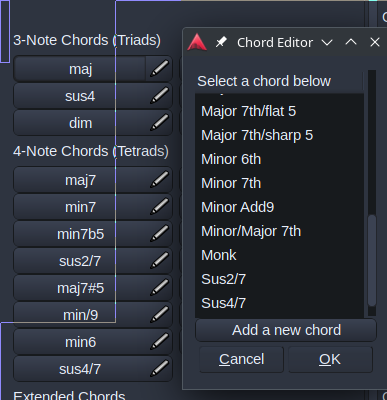
-I can see you can add/create a new chord in chord editor, but, once you created it, i don’t see where the newly created chord “went” or how can you utilize this new creation ?
-I’m not a music theory expert, but i would like if you could create a chord and then drop/change the root note. It’s not unusual to play different bass notes or walk the bass down the scale while chord stays the same. So, basicaly, to add a function to diminsh/augment the root note too.
-Also, there’s this thing where midi notes are triggered to play even when you point the playhead and start the playback from the middle of the notes/chord time duration. Shouldn’t notes be triggered to play only if you start the playback on/before the beginning of midi notes?
-This is just a preference and maybe it’s just me, but i would like to be able to click and drag the playhead in pianoroll also, the same way you already can in editor. Wouldn’t that be cool?
It seems a two-step process. You first create it, then you click on one of the existing chords, then you right click, and replace the existing one with the newly created one from the list.
It is a bit of back and forth, until i got it (sometimes i close and re-open the pianoroll, it is not that clear to me yet, but it works).
After i added the chord, i right-clicked on major, and as you see the created chord “Monk” is in the list. “major” will then be replaced with the chosen name.