Huh?? What previously happened was that if g_stat() failed, the code was returning with FALSE and never bothering to test with g_access(). But if it had tested, g_access() would’ve succeeded (i.e. it would’ve returned 0). What I’ve done is to change this such that if g_stat() fails, the code will go on to test again with g_access() - and it’ll only return false if BOTH tests fail.
So you don’t rely on g_stat at all on Windows, you just pretend it succeeded even if it fails, and continue to check g_access() regardless. Maybe this can a workaround on Windows.
Have you verified that this works, and g_access() returns false on a read-only folder or read-only file-system (e.g. USB drive)?
–
PS. what’s worrying is that we use g_stat() in many places. Though in most cases jus for file modification time and/or file-size.
The basic problem is that g_stat() / stat() etc don’t seem to work properly with OneDrive folders. For non-OneDrive folders, g_stat() and g_access() both work as expected, although I haven’t tried folders on a USB drive (I could maybe try that tomorrow…)
Hi Robin. I ran some further tests this morning with a USB drive and the results for folders and files were identical to a normal drive (i.e. non-OneDrive). However, it reminded me of something that’s VERY important…
In Windows, folders don’t have a “read-only” flag. Yes you can right-click a folder and set it to be read-only but what actually happens is that Windows sets the read-only flag for all files within that folder. The folder itself always remains unchanged (in other words, folders are always deemed writable). In fact there’s a very good chance that when calling g_stat() it’ll likely give undefined results if you pass a folder - hence why g_access() reports folders as writable while g_stat() doesn’t. In fact even with POSIX, the g_stat() documentation suggests that it should only get used for files:-
So if Ardour needs to call ‘PBD::exists_and_writable()’ and pass a folder path, does this suggest that ‘PBD::exists_and_writable()’ should be sticking to g_access() and shouldn’t even call g_stat()?
In fact I just changed ‘PBD::exists_and_writable()’ to be this and it works successfully here for USB drives, normal drives and OneDrive:-
bool
exists_and_writable (const std::string & p)
{
	if (g_access (p.c_str(), W_OK) != 0) {
		DEBUG_TRACE (DEBUG::FileUtils, string_compose("exists_and_writable g_access '%1': !W_OK\n", p));
		return false;
	}

	return true;
}
It works here for existing and non-existing .ardour files and it successfully detects if they’re writable or read-only. For a non-existent folder it correctly returns FALSE. And for an existing folder it always detects it as writable (i.e. correctly). So I wonder if those tests would work correctly for the non-Windows platforms?
@paul / @x42 - if you’re still not convinced, could we maybe release something like this to get some reactions…?
bool
exists_and_writable (const std::string & p)
{
#ifdef PLATFORM_WINDOWS
	if (g_access (p.c_str(), W_OK) != 0) {
		DEBUG_TRACE (DEBUG::FileUtils, string_compose("exists_and_writable g_access '%1': !W_OK\n", p));
		return false;
	}

	return true;
#else

	// <--- The existing code could go here

#endif
}
How about existing folders that are read-only? Either because the permission is unset, or it belongs to a different user, or is currently locked or because it’s a read-only (write protected) disk?
One we establish that those are correctly identified I’ll merge it.
So far it is safer to report a read-only session, rather than failing later when the user did some work and things fail actually writing new audio to the folder.
From testing here (and from my previous understanding) there’s no such thing as a write-protected folder on Windows. And the only disks I know that are write protected are CD’s / Blu-ray disks and the like. I doubt anyone would be expecting to edit Ardour sessions from either of those. Either way, the call (in Session::load_state() ) looks like this:-
_writable = exists_and_writable (xmlpath) && exists_and_writable(Glib::path_get_dirname(xmlpath));
So I’d expect the original “not writable” message to still get displayed. Unfortunately I don’t have a CD drive or Blu-ray drive any more so I can’t test that here - though maybe @lennier or @gruust could test it? (if it’s relevant)
Sure there is. Create a folder as administrator, then try to write to it as user.
Can you check, say C:\Program Files? A normal (not admin) user should not be able to write there.
yes, or a session on a read-only network share
Some External USB disks have a switch, but more commonly this happens after a disk-scan failed. Apparently you can also mark disks read-only by setting an attribute: either on partition or file-system level.
We may not need to worry about the latter, since that likely triggers warnings earlier, yet I hope g_access() also correctly reports false there.
Okay it gets interesting here…
I’ve access to C:\Program Files so I copied a session into C:\Windows\system which required me to give Administrator permission. I then edited the session permissions so that ordinary users only have read permission and I opened it in Ardour - initially with your original code for PBD::exists_and_writable().
Interestingly, this didn’t give me any initial message when loading the session and once in the session, it allowed me to edit the timeline and even use Session->Save, all without seeing any errors. But once I tried to Quit, I saw the following messagebox:-
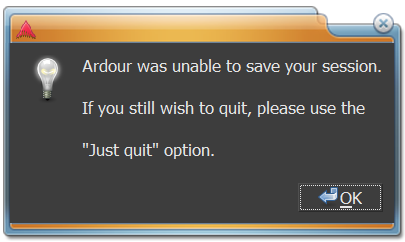
So I then rebuilt the code using my own changes (from above) and that gave me exactly the same behaviour at runtime.
Unfortunately I’m running an old version of Ardour still so can’t really test any nightly builds etc. All I can offer to potentially help is my observation that my older existing Ardour projects seem to still work fine and can be opened, edited and saved as normal. Any new projects though will initially work (by disabling OneDrive sync when creating them) but as soon as OneDrive is allowed to sync the files they immediately become read only as far as Ardour is concerned. Likewise for an old project if you save a new copy.
At the moment I’m working around the issue but it’s great to know that you’re looking at a solution as I hope to upgrade Ardour in the near future so hopefully I might be able to maintain my previous workflow.
I just applied a variant of this in 9.0-pre0-1204: Fix false read-only detection of sessions on Windows with OneDrive · Ardour/ardour@6c8a2ec · GitHub
With regard to my post from Apr 17th (the one about C:\Windows\system) I was taking another look at it this morning. The initial problem (OneDrive) is fixed now in Ardour - though not yet transferred to Mixbus - but when opening sessions or saving files, their read-only status only gets detected if the file’s “read-only” flag is set. If it’s read-only due to a permissions issue, that doesn’t get detected until trying to close the session. So in theory, a user could do hours of work, thinking it was all getting saved when in fact, it wasn’t.
So to handle permissions issues, maybe a possible solution would be to check the file’s date & time just before saving and then check again after an attempted save. And if the date & time are identical, flag that up to the user?
Ardour saves a session at session creation, and then periodically saves the session every 2 mins (unless actively recording), and before each record pass. So this would show up much sooner.
Besides you can always do a save-as…
When saving a session, a temporary file is written to disk in addition to the existing session file in the same folder. Only if this succeeds the session file is replaced with this temporary file.
In addition to your concern this also ensures that there is sufficient disk-space.
That’s true - and with respect to the temp file I see lots of errors in Ardour’s error log that look like this:-
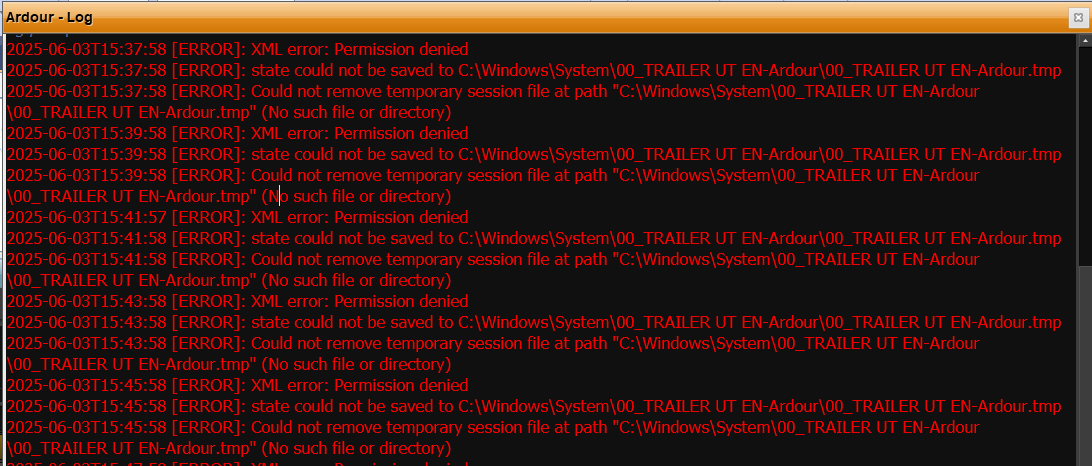
but there’s no actual message box, so if the user wasn’t looking at the log he’d never know there was a problem. I’ve noticed this line in Session::load_state():-
_writable = exists_and_writable (xmlpath) && exists_and_writable(Glib::path_get_dirname(xmlpath));
and the basic problem is that _writable is being set as true in this case, when it should be false (probably just an extra test is needed somewhere?)
One would think that a blinking red light attracts some attention… and a user then clicks it and read the message(s).
But you’re probably right that we should use a popup message window for this case.
On my monitor the red indicator in the corner for log errors is very small, and I would often not notice it blinking if I was concentrating on channel controls.
2 Likes
Hi Robin - I’m not claiming it’s an elegant solution but g_rename() looks like it might help here (i.e. it can show us when a file is read-only for reasons of ownership - even though its read-only flag might be unchecked).
There are calls to exists_and_writable() at line 1012 in Session::load_state(). I tested it here by expanding those calls to the following code and Ardour then correctly detected read-only session files, regardless of whether it’s because their read-only flag was set or whether it was a permissions issue. In either case when the session got loaded:-
- I saw a popup warning,
- Session->Save got grayed out - and,
- Ardour didn’t attempt autosaves etc.
Maybe that’ll give you some ideas for a better fix? I tried it with OneDrive sessions too here and it didn’t cause any problems.
if (_writable = exists_and_writable (xmlpath)) {
	std::string tempname = xmlpath + "-tmp";

	if (0 == g_rename (xmlpath.c_str(), tempname.c_str())) {
		if (0 == g_rename(tempname.c_str(), xmlpath.c_str())) {
			_writable &= exists_and_writable(Glib::path_get_dirname(xmlpath));
		} else {
			_writable = 0;
		}
	} else {
		_writable = 0;
	}
}
Are you proposing to move the session file during session load? That sounds dangerous to me. If at all, make a copy or try creating some other temporary file.
But this means that ::exists_and_writable() API is useless, and all users of exists_and_writable would need to do a similar hack.
I think we should rather fix exists_and_writable and not change Session::load_state at all (or remove exists_and_writable).
It doesn’t move anything to a different folder. It just renames the file temporarily. So a file called whatever.ardour would become whatever.ardour-tmp and if successful, it’d immediately then go back to its original name (though of course, renaming all falls down if there’s already a file with the relevant name  ). Just an idea to stimulate some thought maybe…