There are separate packages for pipewire JACK support, but you can’t have both pipewire JACK and original JACK installed together, at least not easily.
On my system I currently do not have pipewire-jack-audio-connection-kit (as it is called in Fedora) installed, but I do have jack-audio-connection-kit installed, which installs what is usually referred to as jackd v2 (which is actually v1.9.20).
Chris I have QJackCtl. I installed it from the Ubuntu software center
I forgot to point out that I don’t start QjackCtl before to use either Hydrogen or Ardour.
Well if alsa works maybe stick with it until the fix comes down the pipeline?. I think the best bet for a downgrade is disabling that repository and jist finding another trustable one with 3.53. There is a downgrade process but to be honest it seemed quite a process.
QJackControl is an application to make Jack connections, it is not related to the version of the JACK server implementation, and is not needed to use JACK, it just provides a convenience in some situations.
It isn’t quite as easy as “dnf downgrade pipewire” like it is on Fedora, but not much harder.
apt-cache showpkg pipewire
Should show you the versions available, then pick whatever version is right before 0.3.55 and install with apt-get install pipewire=version you want
Thank thats good info. I wasnt aware it was that easy. The tutorial i looked at made it seem a lot more involved.
Thanks Chris.
Referring to the listing, my Pipewire version should be 0.3.56 even if in some points it says 0.3.48
leo@leo-Lenovo-V110-15ISK:~$ apt-cache showpkg pipewire
Package: pipewire
Versions:
0.3.56-1~ubuntu22.04 (/var/lib/apt/lists/ppa.launchpadcontent.net_pipewire-debian_pipewire-upstream_ubuntu_dists_jammy_main_binary-amd64_Packages) (/var/lib/dpkg/status)
 Description Language:
                 File: /var/lib/apt/lists/ppa.launchpadcontent.net_pipewire-debian_pipewire-upstream_ubuntu_dists_jammy_main_binary-amd64_Packages
                  MD5: df002cc10e79222f0911353e3dfa9350
 Description Language:
                 File: /var/lib/apt/lists/ppa.launchpadcontent.net_pipewire-debian_pipewire-upstream_ubuntu_dists_jammy_main_binary-i386_Packages
                  MD5: df002cc10e79222f0911353e3dfa9350
 Description Language: en
                 File: /var/lib/apt/lists/ppa.launchpadcontent.net_pipewire-debian_pipewire-upstream_ubuntu_dists_jammy_main_i18n_Translation-en
                  MD5: df002cc10e79222f0911353e3dfa9350

0.3.48-1ubuntu1 (/var/lib/apt/lists/it.archive.ubuntu.com_ubuntu_dists_jammy_main_binary-amd64_Packages)
 Description Language:
                 File: /var/lib/apt/lists/it.archive.ubuntu.com_ubuntu_dists_jammy_main_binary-amd64_Packages
                  MD5: 7683ccf51ec444edb89ba51bf96fc96c
 Description Language:
                 File: /var/lib/apt/lists/it.archive.ubuntu.com_ubuntu_dists_jammy_main_binary-i386_Packages
                  MD5: 7683ccf51ec444edb89ba51bf96fc96c
 Description Language: it
                 File: /var/lib/apt/lists/it.archive.ubuntu.com_ubuntu_dists_jammy_main_i18n_Translation-it
                  MD5: 7683ccf51ec444edb89ba51bf96fc96c
 Description Language: en
                 File: /var/lib/apt/lists/it.archive.ubuntu.com_ubuntu_dists_jammy_main_i18n_Translation-en
                  MD5: 7683ccf51ec444edb89ba51bf96fc96c


Reverse Depends:
  gstreamer1.0-pipewire,pipewire 0.3.56-1~ubuntu22.04
  wireplumber,pipewire 0.3.45
  pipewire-bin:i386,pipewire 0.3.5
  pipewire-bin:i386,pipewire 0.3.5
  pipewire-audio-client-libraries:i386,pipewire 0.3.5
  pipewire-audio-client-libraries:i386,pipewire 0.3.5
  pipewire:i386,pipewire 0.3.56-1~ubuntu22.04
  pipewire:i386,pipewire 0.3.56-1~ubuntu22.04
  libspa-0.2-modules:i386,pipewire 0.3.5
  libspa-0.2-modules:i386,pipewire 0.3.5
  libpipewire-module-x11-bell:i386,pipewire 0.3.5
  libpipewire-module-x11-bell:i386,pipewire 0.3.5
  libpipewire-0.3-modules:i386,pipewire 0.3.5
  libpipewire-0.3-modules:i386,pipewire 0.3.5
  pipewire-tests,pipewire 0.3.56-1~ubuntu22.04
  pipewire-pulse,pipewire 0.3.56-1~ubuntu22.04
  pipewire-media-session,pipewire 0.3.39
  pipewire-locales,pipewire
  pipewire-locales,pipewire
  pipewire-bin,pipewire 0.3.5
  pipewire-bin,pipewire 0.3.5
  pipewire-audio-client-libraries,pipewire 0.3.5
  pipewire-audio-client-libraries,pipewire 0.3.5
  pipewire-audio-client-libraries,pipewire 0.3.56-1~ubuntu22.04
  libspa-0.2-modules,pipewire 0.3.5
  libspa-0.2-modules,pipewire 0.3.5
  libpipewire-module-x11-bell,pipewire 0.3.5
  libpipewire-module-x11-bell,pipewire 0.3.5
  libpipewire-0.3-modules,pipewire 0.3.5
  libpipewire-0.3-modules,pipewire 0.3.5
  libpipewire-0.3-0,pipewire 0.3.56-1~ubuntu22.04
  wireplumber,pipewire 0.3.45
  xdg-desktop-portal-tests,pipewire 0.3.10
  gnome-remote-desktop,pipewire 0.3.0
  pipewire-audio-client-libraries:i386,pipewire 0.3.5
  pipewire-audio-client-libraries:i386,pipewire 0.3.5
  xdg-desktop-portal-wlr,pipewire
  xdg-desktop-portal-tests,pipewire 0.3.10
  pipewire-media-session,pipewire 0.3.39
  pipewire-tests,pipewire 0.3.48-1ubuntu1
  pipewire-pulse,pipewire 0.3.48-1ubuntu1
  pipewire-audio-client-libraries,pipewire 0.3.5
  pipewire-audio-client-libraries,pipewire 0.3.5
  pipewire-audio-client-libraries,pipewire 0.3.48-1ubuntu1
  pipewire-bin:i386,pipewire 0.3.5
  pipewire-bin:i386,pipewire 0.3.5
  pipewire:i386,pipewire 0.3.48-1ubuntu1
  pipewire:i386,pipewire 0.3.48-1ubuntu1
  libspa-0.2-modules:i386,pipewire 0.3.5
  libspa-0.2-modules:i386,pipewire 0.3.5
  libpipewire-0.3-modules:i386,pipewire 0.3.5
  libpipewire-0.3-modules:i386,pipewire 0.3.5
  gstreamer1.0-pipewire,pipewire 0.3.48-1ubuntu1
  pipewire-bin,pipewire 0.3.5
  pipewire-bin,pipewire 0.3.5
  libspa-0.2-modules,pipewire 0.3.5
  libspa-0.2-modules,pipewire 0.3.5
  libpipewire-0.3-modules,pipewire 0.3.5
  libpipewire-0.3-modules,pipewire 0.3.5
  libpipewire-0.3-0,pipewire 0.3.48-1ubuntu1
  gnome-remote-desktop,pipewire 0.3.0
Dependencies:
0.3.56-1~ubuntu22.04 - libpipewire-0.3-modules (5 0.3.56-1~ubuntu22.04) pipewire-bin (5 0.3.56-1~ubuntu22.04) init-system-helpers (2 1.52) pipewire-locales (0 (null)) pipewire:i386 (35 0.3.56-1~ubuntu22.04) pipewire:i386 (38 0.3.56-1~ubuntu22.04)
0.3.48-1ubuntu1 - libpipewire-0.3-modules (5 0.3.48-1ubuntu1) pipewire-bin (5 0.3.48-1ubuntu1) init-system-helpers (2 1.52) pipewire:i386 (35 0.3.48-1ubuntu1) pipewire:i386 (38 0.3.48-1ubuntu1)
Provides:
0.3.56-1~ubuntu22.04 -
0.3.48-1ubuntu1 -
Reverse Provides:
leo@leo-Lenovo-V110-15ISK:~$
So did you try changing to 0.3.48 to see if that version does not have the problem?
While pipewire isn’t ready for prime-time (I would not yet use it for a live performance or critical infrastructure), the only way that it will get there is thanks all your the testing, patience and bug-reports!
Be it distro-specific advice or direct upstream reports, keep it coming!
i had this same problem on ubuntu - ardour wouldn’t load and neither would carla-rack (carla by itself would though). the ppa released a bug-fix update for pipewire a few days ago, so just update and make sure the new version is running.
Chris, I haven’t tried yet because I reinstalled the OS. The problem now is which Ardour to install: the one from the site (I’m a subscriber), the one in the Ubuntu Software (6.9), the one from the repository which I don’t know what version is or the one, if there’s any, from Flatpak?
A bit confusing. Also. Having understood that Hydrogen doesn’t need Jack anymore, I can probably avoid installing QJackCtl
Robin, I only use Ardour to record by myself, no live nor anything like that.
If you have the official build, that is always the recommended version.
I don’t think Hydrogen is available as a plugin, so if you do not use JACK to route Hydrogen outputs to Ardour, you will be limited to having Hydrogen export patterns as wav files that you can import into an Ardour session.
And as I pointed out previously, installing QJackControl is optional to use JACK, you can do everything you need from within the Ardour audio connections window.
Do you know how Ubuntu handles Pipewire JACK support? I see separate pipewire-pulse packages listed in that apt-cache output, but nothing called pipewire-jack.
Pipewire has a JACK API implementation, but you have the option of running pipewire as a JACK server, or having pipewire run only desktop applications, and run the traditional jackd when you want to use audio production applications. To have Pipewire run as the JACK server you need to install the optional pipewire-jack modules, and it is not clear if you have done that on your system or not.
No, I don’t know that technical stuff (Ubuntu handling Pipewire jack support), however I use Hydrogen as stand alone. I make the drum track then I export as wavs and import into Ardour, I don’t use Jack to route it.
Here I am. Finally! It works, or anyways it seems it does. I haven’t installed QJackCtl, only Hydrogen and Ardour from the Ubuntu repository, actually is the version 6. I should have the courage to remove it and install the latest version, but I don’t know if I’m going to have problems.
I was able to adjust the parameters and other stuff in the preferences however I haven’t tried yet to load some piece of music I made when I was on Ubuntu 20.04 to see if it works or not.
Is there a way to update Ardour from inside the program or do I have to remove the old version and install the newer? I don’t remember how I did with the old versions.
AFAIK, you can install the version from the website alongside the distro version. No need to remove anything. The version from ardour.org installs in /opt and it is called Ardour6 (not sure about the capital “A”). This way you can also test different versions, or use an old one for old sessions.
No problem then, just use ALSA backend. The only thing to be aware of is that the Ardour ALSA backend takes over the sound interface, so you can’t for example pop up YouTube to check out something quickly while Ardour is still running, only audio from Ardour will be available while Ardour is running.
What takes courage is relying on Ubuntu builds of audio applications, from all the problems I hear about it seems like Ubuntu manages to mess that up relatively frequently.
Neither, you do not update from within the program, but you can install the version from ardour.org alongside older versions from ardour.org as well as alongside your distribution version.
You will need to pay attention to what program you are actually starting. If you install the version from the Ardour website it will be installed into the directory /opt/Ardour-6.9.0 and the program full path will be:
/opt/Ardour-6.9.0/bin/ardour6
The version from Ubuntu is probably in /usr/bin/ardour6 so you would need to either type in the path to the version you want in a terminal, or make desktop shortcuts to point to the Ardour.org version, or shortcuts to both if you want to be able to go back and forth between the official build and the Ubuntu build for some reason.
Thanks for the infos, mates.
Well, in the end everything seems to work apart I have no audio at all 
The computer audio works fine, the problem is with the soundboard (Behringer UMC204HD) that worked perfectly in the previous Ubuntu version.
I don’t even hear the metronome.
The board is new, the connections haven’t been touched nor modified.
I checked some stuff in the system
leo@leo-Lenovo-V110-15ISK:~$ aplay -l
**** Lista di PLAYBACK dispositivi hardware ****
scheda 0: PCH [HDA Intel PCH], dispositivo 0: ALC236 Analog [ALC236 Analog]
  Sottoperiferiche: 0/1
  Sottoperiferica #0: subdevice #0
scheda 0: PCH [HDA Intel PCH], dispositivo 3: HDMI 0 [HDMI 0]
  Sottoperiferiche: 1/1
  Sottoperiferica #0: subdevice #0
scheda 0: PCH [HDA Intel PCH], dispositivo 7: HDMI 1 [HDMI 1]
  Sottoperiferiche: 1/1
  Sottoperiferica #0: subdevice #0
scheda 0: PCH [HDA Intel PCH], dispositivo 8: HDMI 2 [HDMI 2]
  Sottoperiferiche: 1/1
  Sottoperiferica #0: subdevice #0
scheda 0: PCH [HDA Intel PCH], dispositivo 9: HDMI 3 [HDMI 3]
  Sottoperiferiche: 1/1
  Sottoperiferica #0: subdevice #0
scheda 0: PCH [HDA Intel PCH], dispositivo 10: HDMI 4 [HDMI 4]
  Sottoperiferiche: 1/1
  Sottoperiferica #0: subdevice #0
scheda 1: U192k [UMC204HD 192k], dispositivo 0: USB Audio [USB Audio]
  Sottoperiferiche: 1/1
  Sottoperiferica #0: subdevice #0
leo@leo-Lenovo-V110-15ISK:~$
and
leo@leo-Lenovo-V110-15ISK:~$ cat /proc/asound/cards
 0 [PCH            ]: HDA-Intel - HDA Intel PCH
                      HDA Intel PCH at 0xd1320000 irq 129
 1 [U192k          ]: USB-Audio - UMC204HD 192k
                      BEHRINGER UMC204HD 192k at usb-0000:00:14.0-1, high speed
leo@leo-Lenovo-V110-15ISK:~$
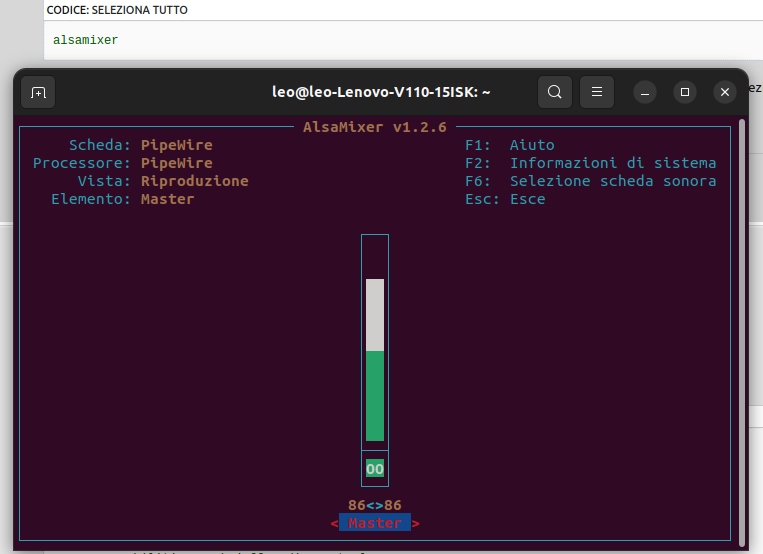
I also checked with the alsamixer though somebody told me it’s not in use anymore since Pipewire manages everything
What audio backend do you select when Ardour starts?
If you did not explicitly select a backend, you can go to the Window menu and open the Audio/MIDI setup window to check.
If Ardour is using the ALSA backend, then make sure to select your USB interface when starting Ardour.
If Ardour is using the JACK backend, that means that Pipewire is running pipewire-jack, and Pipewire is configured to use the PCH audio interface as default. You will either need to go to your system audio configuration tool and select your USB interface as primary interface, or have Ardour stop the JACK backend and change to the ALSA backend if you want system audio to use the onboard audio and only Ardour to use the USB interface.