Am I the only one? XR-18 is not an option when

I wrote about this several months ago but the topic is closed.
I’m curious if this is happening to anyone else.

I have a Behringer XR-18 with X-Touch controller.
If I run the PC without Ardour running all of the audio will play through the XR-18 and I hear it over my audio monitors. If I look at the HARDWARE tab within Ubuntu’s “Sound Settings” both the XR-18 and the HDMI (from the video monitors) are present…

So if I just play a local video, audio track using VLC or a media player it will use the XR-18.
However if I launch Ardour using ALSA of couse it will dedicate the audio engine to use the XR-18 and everything else (VLC, browsers based audio, etc.) will use the HDMI speakers. Once I do this the “XR-18” disappears within the Hardware tab of Ubuntu’s “Sound Settings” and regardless if I shut down Ardour or not it will not allow any audio to play through the XR-18…only over the HDMI speakers within the video monitors. Until now there has only been one way to fix this…reboot the PC.
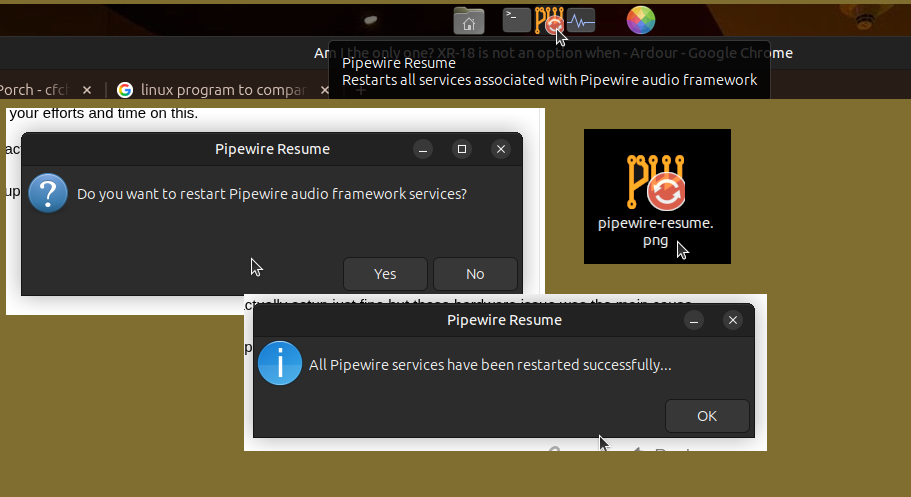
I really go tired of doing this so I dug into this a few months back and found some commands that will sort of restart/reboot pipewire after ALSA took over. From this I made a new application that I install on the last three fresh installs of the linux OS (Debian, Ubuntu Studio, and Ubuntu MATE with Studio packaging) and this works like a charm.

So now if I were to shut down Ardour no other audio would ‘normally’ play through the XR-18 but with a click of this application I made called PipeWIre-Resume, it confirms what this application will do and after it’s done it confirms that it’s been done. Once this happens, the XR-18 shows up again in the Hardware tab of the Ubuntu Sound Settings and I now can play all non-DAW audio through the XR-18/audio interface.

Is anyone else having this happen to them when it comes to running the DAW in ALSA mode makes it impossible for use to use your audio interface for general non-DAW audio pass through unless you reboot the PC?
No, something is not configured correctly on your system.

Agreed.

On my, Kubuntu 24.04, system running Pipewire (I would have to check which version, but it’s not stock)…

EDIT: It’s version 1.4.10

When I run Ardour with ALSA mode, it takes control of the XR18 and my desktop switches to other audio interfaces ( in my case, the onboard HDA audio, as I have my HDMI ones disabled).

BUT:

When I stop Ardour, it releases the XR18 and my desktop audio switches back, which is the expected behaviour.

Something is odd with your setup there.

It may be worth using some diagnostic tools after Ardour has shut down to determine the issue.

Here’s some to start with:

First, if you haven’t already, use aplay to see if your sound card is still present on the system:

aplay -l

This will show up devices irrespective of whether they’ve been disabled on the desktop, so my system shows this:

**** List of PLAYBACK Hardware Devices ****
card 0: PCH [HDA Intel PCH], device 0: ALC1220 Analog [ALC1220 Analog]
  Subdevices: 1/1
  Subdevice #0: subdevice #0
card 0: PCH [HDA Intel PCH], device 1: ALC1220 Digital [ALC1220 Digital]
  Subdevices: 1/1
  Subdevice #0: subdevice #0
card 1: NVidia [HDA NVidia], device 3: HDMI 0 [DELL U3818DW]
  Subdevices: 1/1
  Subdevice #0: subdevice #0
card 1: NVidia [HDA NVidia], device 7: HDMI 1 [HDMI 1]
  Subdevices: 1/1
  Subdevice #0: subdevice #0
card 1: NVidia [HDA NVidia], device 8: HDMI 2 [HDMI 2]
  Subdevices: 1/1
  Subdevice #0: subdevice #0
card 1: NVidia [HDA NVidia], device 9: HDMI 3 [HDMI 3]
  Subdevices: 1/1
  Subdevice #0: subdevice #0
card 2: XR18 [XR18], device 0: USB Audio [USB Audio]
  Subdevices: 1/1
  Subdevice #0: subdevice #0

Run this to see what is using your sound card:

fuser -v /dev/snd/*

You should expect to see pipewire and wireplumb on this list on a typical modern distro like Kubuntu.

For example, this is what I see on my system when using normal desktop apps, but without Ardour running:

                     USER PID ACCESS COMMAND
/dev/snd/controlC0:  kamilner   3889 F.... wireplumber
/dev/snd/controlC1:  kamilner   3889 F.... wireplumber
/dev/snd/controlC3:  kamilner   3889 F.... wireplumber
/dev/snd/seq:        kamilner   3877 F.... pipewire

If Ardour is running, I see this:

                     USER PID ACCESS COMMAND
/dev/snd/controlC0:  kamilner   3889 F.... wireplumber
/dev/snd/controlC1:  kamilner   3889 F.... wireplumber
/dev/snd/controlC3:  kamilner   3889 F.... wireplumber
/dev/snd/pcmC2D0c:   kamilner  540875 F...m ArdourGUI
/dev/snd/pcmC2D0p:   kamilner  540875 F...m ArdourGUI
/dev/snd/seq:        kamilner   3877 F.... pipewire
                     kamilner  540875 F.... ArdourGUI

If I quit Ardour, it goes back to the first list with just pipewire and wireplumb. If it does something different on your system, that’s probably the problem.

I would suggest using these commands before you start Ardour, when it is running, and when you have quit Ardour.

Cheers,

Keith