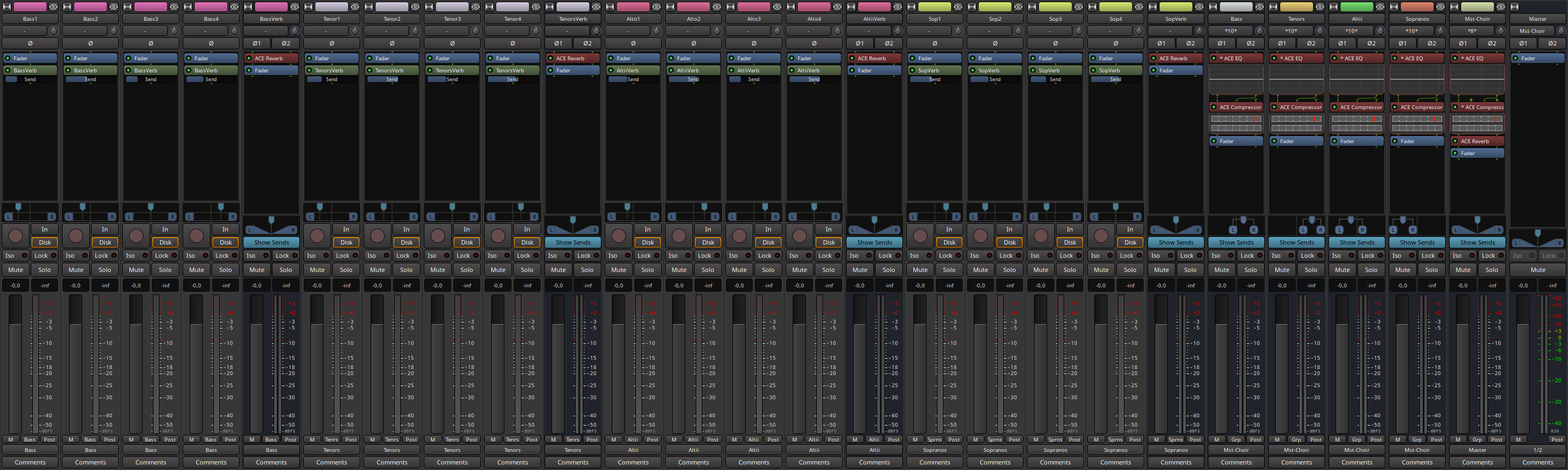
By parallel, I mean a reverb whit which you can choose the balance between wet and dry signal (typically, we’d do this with an aux bus and each track would send to that bus).
Here is a screenshot of a typical session when I do this (the pan and send value are more or less random here, this is just to showcase what it’d look like).
I hope this helps.
3 Likes
That’s a great illustration, and just to clarify for the original poster: the balance between wet and dry signal for any given voice is adjusted by varying the “send” level that goes from that voice’s track into the reverb bus. The reverb plugin itself would be set to fully wet, and by varying the send levels from each track that feeds into the reverb bus you will get a three-dimensional sense of space, with some singers appearing to be closer to the listener than others, especially if these different reverbs use different pre-delay settings. See for example https://www.sageaudio.com/blog/mixing/how-to-create-depth-and-width-with-reverb-and-delay.php
2 Likes
great. thanks a lot for all the advice.
just to check that i understood it correctly:
for each section (i.e. high tenors, low tenors, bariton, bass), i do this:
- i create a bus to which i send all the “raw” tracks belonging to that voice. i would probably do some individual eqing on each track to make them sound a bit different. and i would also pan these tracks a bit left and right to simulate people standing at different positions.
- i create a second bus that gets the same tracks as “sends”. this bus has a reverb. because i use sends, i can have a different mix (in terms of the volume) of each track in this bus compared to the bus described in #1. the volume of the sends thus only influences the characteristics of the reverb.
- the reverb bus then also gets sent to the general section bus.
then of course, combine the different sections, pan them, mix them etc…
is this more or less what you meant?
Except you would only create a single reverb bus in most cases and send ALL the sections to that one bus. Typically you don’t want to have different reverbs for each section as it would make them sound like they are in different rooms, or you would be updating all the reverbs each time you made a change, adding 4x the work or more for you. This way you can process the bus and modify all the reverb at once or make a single change and change it all.
The Reverb bus would then be routed to the master directly generally, and if you are using VCAs to mix, you can still bring down a section AND it’s reverb would naturally tail off as well.
Seablade
1 Like
Not speaking for Eamonn, but I could see, for maximum realism, a rationale for using different reverbs for each section of the choir since they are situated at different distances from the listener – as it’s not just the amount of reverb that varies based on distance, but the nature of the reverb (e.g., reverb time and predelay) as well. In a typical STBA arrangement, the tenors and basses would be farthest away from the listener, with the sopranos and altos closer in on both sides.
As noted above, it’s worth reading this article https://www.sageaudio.com/blog/mixing/how-to-create-depth-and-width-with-reverb-and-delay.php to get a sense of the subtleties of reverb; it’s also worth reading for the discussion of how to bust your mix out of the 90º confines of the pan settings and place every section (or even every individual singer, if you have time and motivation enough) in the the full 180º sound field. This article has more on that as well: https://www.sageaudio.com/blog/mastering/what-is-stereo-imaging.php
Both of those articles appear to have been hastily written and have typos and a few inaccuracies, but they provide a really useful overview of the possibilities.
1 Like
Yes but if you are going to go into that level of detail, there are multiple ways to address it, and primarily you are looking at different predelay times specifically for what you are discussing, something that can be handled with careful routing, panning, and inserting delay appropriately. And of course appropriate reverbs. Some reverbs even allow you to place within a 3D space to modify this to an extent, though I don’t think I have seen a Linux native one yet.
EDIT: Forgot to address another aspect of this. While you are not incorrect for a ‘traditional’ choir in terms of placement, reality is many choirs don’t follow this (Outside of maybe school choirs) in my experience, and adjust based off the needs of balancing acoustically, fitting the space, etc. Also if you want to be ‘realistic’… for most people the amount of reverb will not change appreciably based off the placement of the person in the space in terms of a choir layout, they will all effectively have the same ‘amount’ of reverb, though some frequencies in the space may be more efficient in reverberation than others, giving an illusion of different voices getting a stronger reverb as those voices go into those frequency ranges, but again other ways to handle that as well.
You are not incorrect, but I would argue that especially if you are starting out, it is better to use a single reverb, it is far more important to have your ‘choir’ sound like it is performing in the same space, than to try to get to a level of detail you may not even be able to truly hear, and increasing your work multiple times. Not to mention the a-reverb in particular is a bit basic to even address that aspect of it, I would suggest other reverbs especially on voice in general.
Pay more attention to your panning, dynamics, timing, and mixing, you will get a good strong result. Neither way is wrong necessarily, but if you are starting out and learning, it is far more important to understand the effect of those things than to go overboard trying to get detail out of the reverb that may not exist. There is a reason I address all of those aspects in the students I teach before I even touch on reverb.
Seablade
2 Likes
The articles aren’t bad, but a quick skim through, two things not addressed in those articles:
- The effect of EQ on depth.
- The effect of Dynamics Processing (Compression in particular) on depth. This gets touched on by their sections on faders, but I would argue there is far more to it than just riding faders up and down.
Don’t have time at the moment to write out articles on the effects but both of these also play into building a 2D soundstage (I would argue what they describe in the article is a 2D soundstage, not 3D, and is 99% of what we think of when talking about music mixing and stereo playback).
Seablade
1 Like
Small clarification on the multiple reverb in my example : the reverb specific to each voice would be used to simulate depth, but as mentioned above, there is much more to it than just reverb (early reflections, etc). The reverb used on the master-choir bus would be the one i would use the simulate space.
Today though, I mostly use Panagement to simulate depth.
From all those information, I think you need now to experiment on the subject and see what notion and technique sticks with you. You’ll always have time to expand to more complicated schemes once you’ve reached a first workflow that works for you 
Same here since I realized it was available for Linux. One reverb for space (often zita-rev1 or dragonfly) and Panagement for depth. As @seablade stated, there are many ways to crack this nut depending on experience, time available and how prominent the vocals will be in a mix. Good luck, @thht!
Interesting, wasn’t aware this was available for Linux (Obviously as I even mentioned I didn’t know of one native for Linux), thanks for the heads up!
Is the LV2 cross platform or is it only Linux?
SeabladeOnly Linux. Windows options are VST2, VST3 and AAX.
Well that is a shame, it prevents taking the session cleanly between platforms sadly. Would love to see lv2 or vst3 on all platforms, obviously I would rather lv2 but either can work.
1 Like
I just checked the download archive and vst3 is available on all platforms.
Perhaps just ask:
–
EDIT:
The plugins themselves are closed-source, but the framework used to create and build them is free/libre.
I also just learned from the readme that DPlug does support LV2 on all platforms already (except Apple/ARM): https://github.com/AuburnSounds/Dplug#features
I assume if a couple of users ask, p0nce may provide LV2 for the plugins.
2 Likes
Ahh see I haven’t been home to even open up the site on my computer yet, so completely missed that so far:). I will have to do so.
wow. i never thought this would grow into such a complex and rich topic.
thanks to all of you for your suggestions. i will of course, take it slow and start with a low complexity and then see where things take me. but thanks for laying out and explaining so many options!
when the piece is finished, i will for sure post it in the “made with ardour” section and leave a small comment here so if you are interested, you can hear how it turned out.
thanks again!
2 Likes
Panagement 2 is awesome. It would be even better if it had multiple inputs to use it for an entire mix, but that doesn’t seem to be feasible (see discussion).
One word of caution though: part of its effectiveness derives from the use of delay between the left and right output channels. This means that the stereo output is not mono-compatible: summing the two channels will result in comb filtering and degradation of tonal quality.
This may or may not be a problem when used for final mixing, depending on usage; it’s definitely a problem when generating a stereo signal that is then mixed in ways that change its stereo width, because that will cause a partial or total summation of the two channels.
(Apologies to the original poster for the off-topic.)
1 Like
Correct, this is the danger of delay based panning and building stereo image through the use of delays, and a very good thing to point out.
Any time you have two signals with different timings summed together you will get comb filtering, how bad depends on timing difference and frequency content, so you should always check your mixes for mono compatibility. Even in today’s society it can be important as some mixes may be listened to for instance on a cell phone speaker phone which may as well be mono, or in some venues over mono systems … remember two or more speakers doesn’t necessarily mean stereo reproduction.
SeabladeHowever, one can disable the delay in Panagement 2: then it will only use level differences (like a standard pan-pot control) and early reflection/reverb levels. It will be less effective but mono-compatible, and still a very good user interface.