I found that the button for adding fx instances in the pin connections plugin dialog is missing in Ardour 9.7. I used this feature because of some multichannel projects.
Is this a bug or a new improvement?
Also one of my v8.6 project crashes Ardour v9.x with a plugin that should have two instances set manually. If I remove this plugin in v8.6 then the project loads fine but if I add it back in v9.7 I can’t set a second instance for it because of the missing instances button.
p.s.: I just found this issue affects vst3 plugins only, lv2 and vst2 plugins are unaffected.
In the past Ardour incorrectly treated them like VST2s, but most VST3 can actually reconfigure themselves to a given channel-count, when asked to do so. Replication broke various plugins, and incorrect VST2-like configuration broke many others. This was fixed in Ardour 9.0.
This is the same for Apple’s Audio Units, where Ardour also does not offer replication, except Apple does a much better job at this compared to Steinberg and most VST3 authors.
I see. But why is that the new 9.x is not backward compatible? Why is that it just crashes while it loads my project without any error message or a warning dialog or disabling the affected plugin with the now incompatible configuration?
If I would like to use this feature then is Ardour 8.6 the last working version for me?
Well, Ardour 9 should load Ardour 8 sessions, but there is no real guarantee that it’ll sound the same. e.g. when we introduced bus latency compensation many older mixes will sound different.
What plugin(s) break this for you? Harrison in particular tested a lot of plugins… but I’m sure there are some that may not like to be replicated when also configured as multi-channel.
Does it help to load the session in safe-mode (disable all plugins), and then remove the affected one?
likely, yes. This feature should never have been in Ardour for VST3 plugins to begin with…
So it seem that every vst3 plugin IF the “Manual Config” is turned on and used.
Does it help to load the session in safe-mode (disable all plugins), and then remove the affected one?
No. Because it disables everything and there is no way to turn on the plugins one by one to find the one that causes the crash, the problem.
NOW while checking things for this reply I found that turning on the “Manual Config” button in the “Pin Configuration” leads to the crash when opening the session in v9.7. Even if it is created in v9.7.
Just create a New → Advanced Session → set the “Master bus channels” to 4 → add a vst3 plugin to the Master bus (I added ACM210X1) → right click on the plugin → “Pin Connections…” → enable “Manual Config” → close the “Pin Connections” dialog → save the session → quit Ardour → start Ardour → open the session → loading → crash.
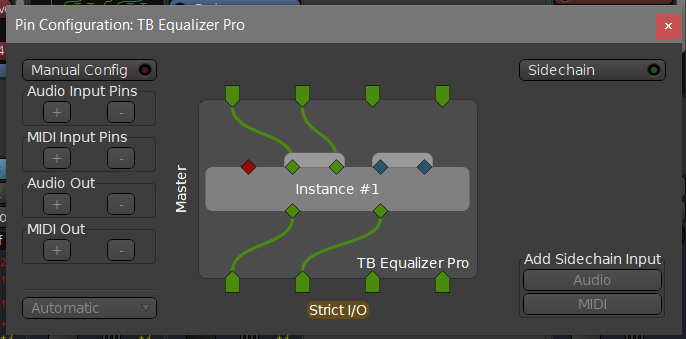
Regarding this, the TB Equalizer Pro (VST3) supports up to 128-channel audio. In Reaper it reconfigures itself to the given channel number but in Ardour 9.7 what I get is this:
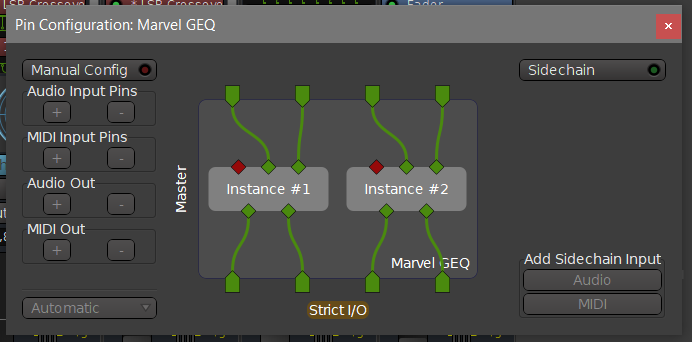
The Voxengo Marvel GEQ (VST3) supports multi-channel processing (up to 8 input/output channels) and in Reaper it correctly reconfigures itself but in Ardour 9.7 two instance are set up:
Yes, semantics for VST3 changed.
In the past Ardour incorrectly treated them like VST2s…
So at the end I can’t see what is changed for the better with this “semantics for VST3 changed”. The bad implementation which was useful and worked beforehand is not working anymore, even crashes Ardour, and the corrected current approach or implementation works incorrectly.
Thanks for the feedback. Something looks indeed very broken there.
Sadly I don’t have access to any of the plugins you mentioned. I was hoping for a free/libre software VST3 to reproduce this on GNU/Linux, that would significantly simplify investigating/fixing this. I’ll can ask Harrison if they have access and can investigate.
I tested with IEM Ambisonics VST3s and those adjust to the number of available channels just fine. Sadly the AVA LegacyQ fell into disrepair and does not work on Linux anymore.
On Linux I can’t replicate the crash with the steps I described. (And I don’t have an old 8.x package for creating an older configuration.)
But the multi-channel TB Equalizer Pro is incorrectly configured just as is on the picture above, and the TB Barricade v4 which also comes with multi-channel support gets two instances. In Reaper are both correctly set up.
These Toneboosters plugins have Linux versions and in demo mode they are fully working and are only limited by a nag screen to buy them. Their developer Jeroen Breebaart is also responsive and ready to help.
My Linux distribution provides old packages so I installed v8.12 on my Linux system.
A v8.12 session with “Manul Config” pin connections (with the steps I described beforehand) will crash v9.7 on Linux also.
I used the ACM210X1 VST3 plugin for Linux.
But it is the same with:
Zam Audio: ZaMaximX2 VST3
ZL Audio ZL Equalizer 2 VST3
Then I deleted the plugins in v8.12 from the session.
Then in v9.7 I added the ZL Equalizer 2 to this session and set it to “Manual Config”, and save and quit. Then I started again the 9.7 and opened the session and it crashed.
I cannot yet reproduce this with ZamMultiCompX2 VST3 (I don’t have ZaMaximX2 here as VST3), to a 4 channel track. I enabled manual config for the plugin. Save. Quit. …and the session loads just fine (using current ardour/git local dev build).
All Zam VST3s are built with DPF, so I expect them to behave the same. I’ll also try with an optimized 9.7.0 build.
–
EDIT: I was able to reproduce the crash by loading a 8.12 session with replicated plugins/ This crash is fixed now in Ardour 9.7-274-g84142216d5 (at least for zam-plugins VST3).
I’m getting a weird behavior with mono VST3 on stereo tracks, the instance is duplicated but changing the plugin’s parameters only affect the left channel (the right channel keeps on the initial values). This only occurs when using the plugin’s UI, it behaves normally when using the generic UI.
MixBus made “improvements” in v11.2 which finally permitted some multichannel VST3 reverbs to appear with all the tracks in place. Once discovered, they hobbled it again for v11.3 and made things worse. Todd mentioned sending their “fix” to the Ardour team, which may have caused issues for Ardour. The idea that Harrison tests these things is comical. I have lots of audio apps. None perform as badly with plugins as Ardour/MixBus.
Harrison opposes, vehemently, anything multichannel. It is not tested, not supported, and treated with hostility when discussed. Ardour has previously been ok with multichannel VST3’s, but no more. I would also like to see this improved, but I suspect none of the devs on either team uses anything from Liquidsonics.
There has ever only been one person working on VST3 support for Ardour and Mixbus and that is me. I’m glad to take all the blame
Given that I use GNU/Linux, and only have free/libre plugins around, no.
But I do use IEM Ambisonics multichannel plugins and also run the official VST3 test suite.
VST3 is an open standard from Steinberg for all major platforms incl. Linux. It has nothing to do with Microsoft (or Apple).
Yes, I’ve seen this too. It works correctly when using generic controls UI.
When running from source, DPF spits out a lot or error messages, and I believe this to be a missing feature of DPF not supporting VST3’s ISlaveControllerHandler interface to sync replicated instances.
I’m not looking to blame, I’m merely citing what I read on the MixBus forum. I’ve replied there today pointing out the lack of clarity on where to report these issues and what to believe on the forums.
This sync’s with this forum’s original post noting that VST3 support is not reliable. It also seems that between you and Todd, it’s even challenging to know what observed behaviour is right or wrong, especially when behaviours change from release to release. Note also that this was phrased on MixBus’s forum as a multichannel issue, and MixBus strongly opposes anything to do with multichannel and has obfuscated all such issues from their product and the user manual.
Isn’t this a Presonus extension to VST3 ? The only mention of it I found besides Ardour’s is here. I wouldn’t expect FLOSS plugins to implement it if that’s the case even though it’s not proprietary per say.
Well, it looks like you did start a small flame war on the Mixbus forum, rather than taking the opportunity here to engage in constructive criticism.
The Ardour9 / MIxbus v11.3 change was made working together with devs from Audioease com to address issues with Altiverb who reached out. We also had input from Fabfilter in the past (there, mono input was broken - Ardour is one of the few DAWs that actually allows pure mono operation)…
It now looks like properly supporting those (and more commercial VST3s) broke some other plugins, and this is the first time I heard about it. So something needs fixing.