Adding Configuration for External MIDI Devices

I’ve got a few keyboards I’d like to add Ardour support for, e.g. the Roland GO:KEYS 5, and I’ve been searching through the documentation but haven’t had much luck figuring out exactly what needs to be done in order to e.g.:

  • Add a new instrument as an option in the drop-down menu when adding a new MIDI track
  • Add meaningful names for CC channels for that instrument type in the automation menus

Any help on this would be greatly appreciated and I’ll make the config files available if they’re of general use.

*To clarify: These devices already work with sending & receiving MIDI, but I’d like to add configuration for the patch names and CC channels so that they’re not just generic numerical values

I hope one of these well-produced official videos helps you solve your problem:

2 Likes

The patch names are stored in midnam files.
You can find examples here in the Ardour installation directory:
./share/patchfiles/

This page in the manual has some tips for validating new midnam files you create:

I have been looking for an official specification of midnam files (which are apparently more formally called MIDI Name Document files), but it does not seem to be a MIDI Association official specification (at least I cannot find a spec on midi.org).
That ardour manual page does reference a DTD (which would be the validation standard that XML editors or checkers would use), but that link currently generates a 404 not found error, and I did not find that filename using the search function at the web site.
A google search found this copy:
data/midnams/MIDI.midnam · v0.5.024 · Miró Allard / zrythm · GitLab

1 Like

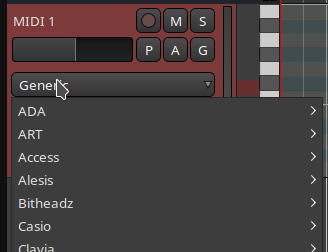
My understanding is that this list is only used for Virtual Instruments, which sit as plugins on the track. If you are intending to use an external hardware MIDI synth, then you would use the option “-none-” here.

You will then get a menu on the track which enables you to select which hardware synth it is:

image

The midnam files @ccaudle refers to are the right ones for this.

Cheers,

Keith

1 Like

We probably need a video on MIDNAM too, I just don’t currently own a device I could use as a lab mouse.

The problem in your particular case is that while https://static.roland.com/assets/media/pdf/GOKEYS_ToneList_multi01_W.pdf is kinda helpful, it also demonstrates that MIDNAM likely won’t work for you.

If you look closely at the reference linked above, you have to use both MSB/LSB for switching between banks and then Program Change (PC) for switching between variations of instruments. It doesn’t seem like MIDNAM allows using MSB/LSB. Perhaps I’m missing something?

I think you can use https://github.com/Ardour/ardour/blob/master/share/patchfiles/MIDINameDocument10.dtd

Update: I’ve just corrected the link on The Ardour Manual - MIDNAM Reference to point to Ardour’s copy on GitHub.

1 Like

It was my understanding (which may be entirely wrong) that CC 0 and CC 32 were used to select MSB and LSB respectively. So, something like:

 <PatchBank Name="GM2 Standard Drum Kit (Default)">
      <MIDICommands>
        <ControlChange Control="0" Value="120"/> 
        <ControlChange Control="32" Value="0"/>
      </MIDICommands>
      <PatchNameList Name="General MIDI Drum Kits"/>
    </PatchBank>

Which sets MSB=120 and LSB=0.

An example of this is in the patch file for the Digitech DSP128 Plus:

Happy to be corrected on that though.

Cheers,

Keith

2 Likes

So, I was thinking about this and I wonder if there’s room for some GUI improvement in future versions of Ardour.

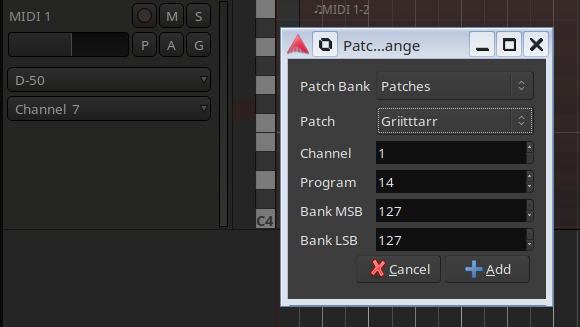
When Ardour (and many other DAWs) first supported MIDI, the primary target was for external MIDI devices, and the GUI seems to have been developed with that in mind: create a MIDI track, then, on the track itself, select what the external MIDI device is. Then, when you insert a patch change, it gives you a device-specific patch selector.
image

And, for percussion tracks, it names the notes. All courtesy of MIDNAM files.

These days, I would estimate that the majority of the MIDI track use is via Virtual Instrument plugins, and the MIDI stuff in the track header doesn’t get used at all. And, for Virtual Instruments, the workflow is entirely different: create a track, select the Virtual Instrument in the track creation dialog, and it gets inserted as a plugin on the track:
image

I’m wondering if those two situations can be unified in some way or, at least, merged a bit.

What In was thinking is, instead of having the External MIDI Device selector in the track header, could this be implemented as a pseudo-plugin.

So, in that case, when a new MIDI track is added, instead of just the Virtual Device selector, there’s the option to select “Virtual Instrument” or “External Instrument”, and the appropriate device selector shown.

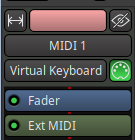
Then, when an external instrument is selected, a pseudo plugin is inserted into the processor box, representing the external device.
image

When opened, the dialogue for this pseudo-plugin would have the configuration that would currently be in the MIDI track header. This pseudo-plugin would, obviously, have some limitations in that you could only have one on a track at any time (effectively, it’s either there or it’s not).

It may even be possible (not sure how) to have the ability to implement a device specific controller at some point (I’m not sure if there are plugin standards which could be leveraged for that)

Of course, I may have missed a glaringly obvious reason this wouldn’t work, but it’s an idea I had that’s been niggling in my brain for the last few days, and which seems to make sense.

I think it would unify the workflow, and make it much clearer what is actually happening.

Thoughts?

Cheers,

Keith
2 Likes

This topic was automatically closed 28 days after the last reply. New replies are no longer allowed.