Way to work with audio samples as MIDI without using a janky sampler?

Lets say 5 and that would be incredible! I’m mostly interested in drum sampling capabilities and I usually do 5 velocity layers (like we did in the AVL-Drumkits as an example).

Having a multi-velocity sampler that allows mixing and matching of drum and percussion samples would be heavenly! Thank you for even humouring the question…

1 Like

I’ll see what I can do

1 Like

Thanks so much! Willing to test or if you want drum samples to test with the samples are all in the SFZ bundles here:

http://www.bandshed.net/sounds/sfz/AVL_Drumkits_1.1-fix.zip

PM me at Linuxmusicians if that is more expedient, thanks again for considering it!

Don’t the samplers in LSP-Plugins have that feature?
Yeah, just double checked and they allow up to 8 samples per note.

Done:

Will a Debian build VST3 run on your OS?

1 Like

Hi,

That was amazingly fast!! :exploding_head:

If you’re talking Debian Bullseye it sure should… AV Linux is a Debian variant.

Hi Chris,

That may well be so, I haven’t delved into LSP very deeply personally

I’m on Debian Testing but hopefully it will still work for you.

Hmmm, well this stuff is never easy especially working backwards from newer support libs. The plugin scan fails for me on Ardour 6.9 (official Ardour bundle) at this point in time…

I did check the obvious file permissions first

2022-08-26T18:12:49 [WARNING]: VST3</home/isotester/.vst3/Sample Auditioner.vst3>: Scan Failed.

It’s working for me in A6.9, I suspect it’s something OS version related. I’ll fire up my proper build system that has an older version and see if that’s any better.

Please try this one - Sample Auditioner Linux.zip - pCloud

Thanks very much for your patience, the new upload does scan and open in Ardour so that’s good… I can’t seem to get it to open a file browser to find samples and there are some residual file paths from your machine in the browser history but maybe these are simply work in progress issues, the Plugin is now found and does open in Ardour. Thanks so much so far, this is some very impressive work!

Ah that’s annoying. I have the same issue, the file browser doesn’t open in Ardour or Qtractor, but it does in Reaper and Carla. Looks like I have some bug hunting to do.

Create a wrapper a script that unsets LD_LIBRARY_PATH and then launches the external file browser. Also use vfork to prevent rt issues.

Preferably ask the host to show a dialog or directly build it in the plugin GUI

2 Likes

Ah I see, so this is a known issue with JUCE - Ubuntu 18.04 can't run VST which needs JUCE_WEB_BROWSER - Linux - JUCE I shall investigate further.

See also

1 Like

Aha thank you, that makes the issue clearer to me. I’ll see what I can do.

1 Like

I found a JUCE flag that allows me to disable the native file chooser. The resulting file chooser is ugly, but it works in Ardour and Qtractor.

2 Likes

Hi!

Confirmed! Works here too! The file Browser isn’t hideous, it just doesn’t match the Plugin UI, not a biggie to me. I can’t test further today but will do so ASAP. Excellent work @DHealey!
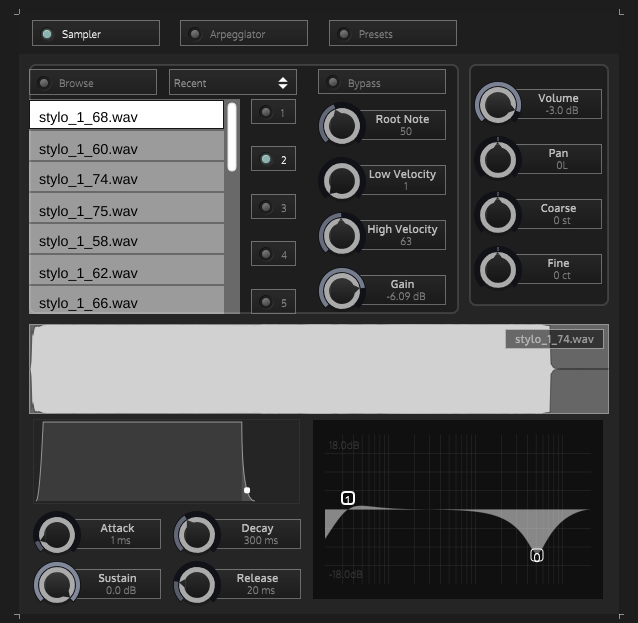
2 Likes

This topic was automatically closed 28 days after the last reply. New replies are no longer allowed.