It’s not difficult and the developers are interested in it so you deliberately don’t implement it… ?
Vertical zoom is very useful when dealing with content that has a large dynamic range. For example some audio can be really quiet which makes it difficult to see details and make precise cuts.
Here is a video demonstrating making a cut in Ardour and then again in Reaper (with vertical zoom). You can see instantly that it is much easier in Reaper because I can see what I’m doing. Now if this was a one off kind of thing it’s not too bad to roughly cut the audio, boost the gain, then make a more precise cut and reduce the gain again, but doing this hundreds of times is not practical.
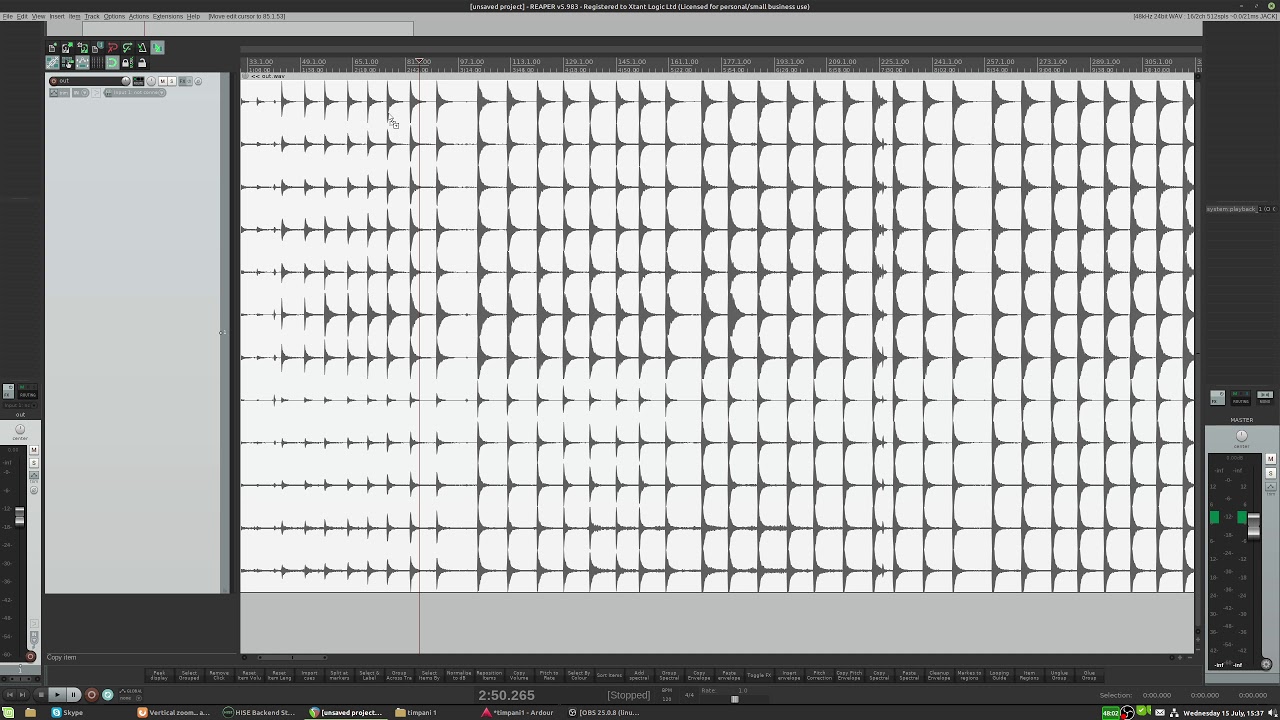
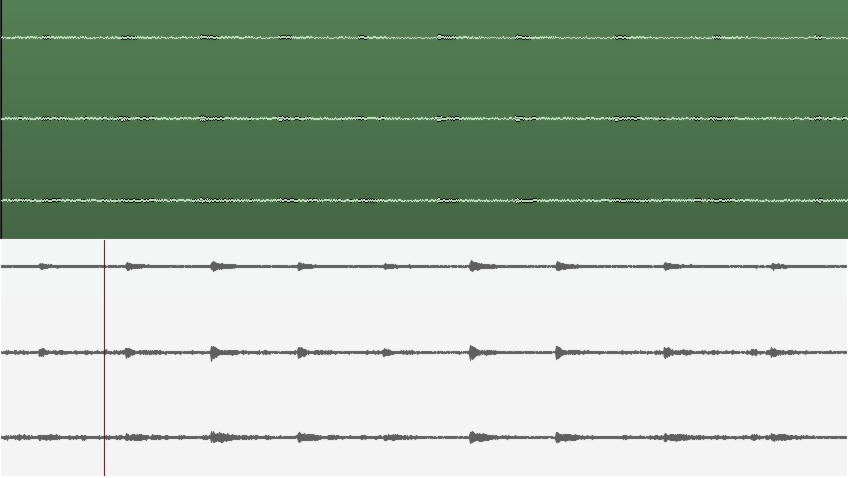
Here you can see a section of audio from just 3 of the channels. In Ardour (top image) I’m in logarithmic view and the waveform looks like noise. In Reaper (bottom image, with vertical zoom) you can see more detail and see that there is some audio there as well as noise.
My primary use is cutting samples. Mixing is not so important (although I use busses when needed). Only having to deal with one track makes my life much easier, I can cut and move hundreds of regions really quickly and I can apply batch scripts which work more quickly on a single track than multiple. But the main reason why it is necessary for me to use a single track is automation. I need to apply pitch shifting (and sometimes other automation) to each channel equally and this can only be done on a single track. It would be far too laborious to copy the automation of thousands of regions between 12 tracks and make sure any future edits are in sync.
I use an onset detector too, but they are not 100% accurate, especially with quiet signals. With some samples (guitars for example) it’s often desirable to cut before the transient to get the noise of the pick as it hits the string but before it plucks it. There are similar situations with other instruments, like catching the breath of the player before a woodwind or brass note. The decision on where to make these more creative cuts is not really suitable for an onset/transient detector.
I’m sure there are other use cases for vertical zoom (otherwise there wouldn’t be so many feature requests for it) but my particular use case I admit is rather niche.
Yes. I don’t listen to the samples much during the initial cutting procedure, the listening comes later in the process. I’m dealing with several hours or recordings (8 for my current project) and listening to the whole thing again and again is a waste of time when I can quickly pin point areas of interest by looking at them. For example, if I see a big area of silence or a sudden spike in the waveform I can zoom in and check it out without having to listen to the whole recording.
For a lot of tasks looking at the waveform is faster than discovering it by listening. Even when it comes to the listening part if I find a problem and it’s a tricky thing to hear exactly which part of the audio has the issue I might open it in Audacity’s spectral view so I can see what I’m working with in even more detail.
Yes. The normalization is the final step (and Ardour even allows me to normalize on export which is great!). After the samples are cut, tuned, edited, etc. they are normalized individually. And then in the sampler a controllable and realistic gain curve can be added in to restore the relative gain between dynamic levels.
Even if I were to normalize the region before I cut the samples the quiet stuff will still be pretty quiet and the waveform difficult to see because the loud parts are already much louder. My recordings often have a huge dynamic range.
The normalization of the whole file is not so useful because of the aforementioned dynamic range. However I just played around with the gain boost/cut and pushing this so that the loudest peaks go beyond 0db allows me to see the quietest peaks really well and effectively gives me the same view I would get from vertical zoom. The missing piece was I needed to go back to linear waveform view because in logarithmic view the noise is too prominent. I’ll explore making a lua script to drop the track’s gain as the region is boosted so that I can play back if needed without destroying my ears.
One advantage/disadvantage (depending on situation) to this approach is that the effective zoom of each region is independent, whereas with “regular” vertical zoom all regions would be zoomed equally.
In my view, this would be problematic as a workflow as would be @paul’s normalizing idea. You shouldn’t need to mess to with volume in order to adjust the waveform zoom. For a classical live concert, normalizing each individual piece isn’t an option as it all should have the same room tone level. Also, when I’m cutting I’m always wanting to quickly listen back to double-check I’ve not cut in the wrong place. Ear damage/clipping distortion are big no-nos I think the answer is still a proper waveform zoom feature. Samplitude/Sequoia, Reaper, Studio One, Pyramix, Cubase, Logic Pro X etc all have it.
read back, I did not say that. I said it’s a deliberate choice.
The reason why it’s not present is has nothing to do whether it’s complicated to implement it. I’d actually expect it to be time-consuming to implement it right.
I deliberately reject it because waveform is is not a true representation of the signal (really it should be a lollipop graph, or up-sampled) and operations should not depend on a user interpreting it. Rather tools should be added to facilitate workflow that users currently use a waveview as work-around for.
If someone would add this feature, many follow-up issue will also have to be addressed. e.g. There would need to be clear indication about the y-axis range of every track. Also recording must reset the scale to clearly indicate clipping, etc.
While I’m in the camp that has not had any issues with log view for all my classical cutting, I have seen enough examples to suggest that something is needed. The question for me is not of “true” representation but a visual zoom, however unscientific to assist in cutting. The feature is in enough of the mainstream DAWs for me to consider it a standard (a little like others think of the vertical MIDI velocity “sticks”). I can speak of my experiences in Sequoia…When the waves were too tiny, I increased zoom via a shortcut and once all cutting was done in the problem area, I would just press another shortcut to reset the zoom. Default should obviously be 100% but I was never confused about y-axis range as if zoom was engaged everything looked stretched and it was obvious. For recording, I’m definitely looking at meters, not the waveform but that might just be me.
I hear you but, again, it feels like something of a hack versus just implementing the same tool as other DAWs. There may be scientific reasons that waveforms are not great (does this apply to our regular waveform view, too?) but not once have I used another DAW’s vertical wave zoom and thought “Boy, this is such a bad implementation!” In any case, surely what we hear out of our digital-to-analog convertor isn’t a series of lollipops!
In the end, IMHO, there are workflows that Ardour/Mixbus clearly do better than most DAWs (exporting, for example) but then there are things that people expect to be a certain way. I’m not talking about things done inefficiently; I’m talking about tried and tested efficient workflow. Cutting up regions then normalizing in order to see the waveform (and subsequently returning each to starting volume and stitching back together) isn’t a workflow but a temporary and long-winded approach.
I say all of this respecting that I am not the developer and that clearly Paul, Robin et al. have specific goals and views on what they consider “correct” implementation. I do feel it’s worth sparing a thought for users coming from other popular DAWs which seem to share certain feature sets that have in essence become industry standards for good reason.
If it turns out that vertical zoom is the “correct” approach, I’m fine with Ardour supporting it.
However vertical zooming just encourages workflows that are clearly wrong. e.g. splitting at zero-crossings or cut right at transients. We should discourage those (and provide better tools).
Isn’t splitting a (mono) region at zero-crossings something to be encouraged? I used the snap to zero-crossing feature in SoundForge to edit podcasts extensively. Cross-fading just before a transient (versus “right at”) is something I use all the time for classical editing as apparently the transient “pre-masks” even a messy fade. Correct me if I’m wrong on this!
One of these days I’ll write a blog post, until then prefer to use short fades.
In short, there may be a DC offset, and even if there isn’t, splitting at a zero-crossing only avoids a high frequency jump, but still introduces harmonic distortion.
When converting digital back to analog
a[-2], a[-1], 0, a[1], a[2]
is not the same as
0, 0, 0, a[1], a[2]
I’m afraid this is not at all clear to me but the English explanation above works just fine For classical I’ve only ever used short fades. There are classical engineers that only use butt-splices (i.e. no crossfades) but having been immersed in Sequoia and Pyramix’s crossfade editors I could never fathom why they’d want to do that.
Have a look at the end of https://xiph.org/video/vid2.shtml (band-limiting and timing) – really the whole video should be mandatory watching for sound-engineer and is time well spent!
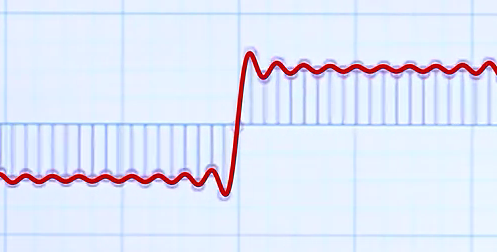
This screenshot if from that video:
If you slice the left half off, you end up with a different signal, since the DAC reconstruction filter includes a low-pass filter.
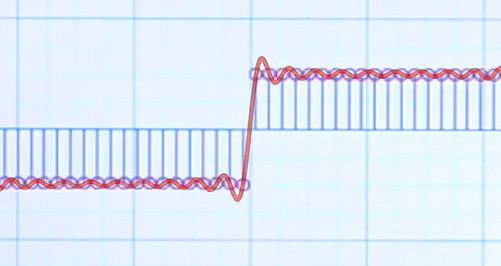
Compare this to the identical waveform drawn as “perfect” square wave (without the zero sample in the center):
PS. @DHealey was spot on with the meme “there is no zero crossing”

 I think the answer is still a proper waveform zoom feature. Samplitude/Sequoia, Reaper, Studio One, Pyramix, Cubase, Logic Pro X etc all have it.
 I used the snap to zero-crossing feature in SoundForge to edit podcasts extensively. Cross-fading just before a transient (versus “right at”) is something I use all the time for classical editing as apparently the transient “pre-masks” even a messy fade. Correct me if I’m wrong on this!