What OS are you running? I now maintain binary packages for several distributions (and FreeBSD), check “files” section on sourceforge. No MacOS yet, because i don’t have a mac to build/test it on.
Probably not the best… the primary goal of this plugin is to be used as a live/realtime amp+cab modeler. Typically you’d feed either a DI recorded track, or signal from an actual instrument connected to your audio interface. If the signal that was recorded doesn’t have too much “sound coloring” from the amp, you could try and it might sound good, depending what kind of amp, clean vs crunch vs hi gain, speakers, mics etc… try mixing some direct signal with the model outputs (dry out knob)
It just says both files loaded successfully… on the top row of buttons (PED, EQ1, etc) make sure the power indicator for AMP and CAB are ON, you can toggle them with right click or with the corresp. checkbox in the Misc. page.
Added a resonator / phaser effect - this is a trick i started using a few decades ago with an old Behringer guitar fx unit called the “Modulizer Pro” …this unit allowed to set the phaser’s LFO frequency to zero and control the LFO position directly. I was able to create some really cool combinations of phaser parameters with this “static LFO” capability, which really add some balls especially to a distorted / hi-gain sound. So, for about 20 years i had this behringer unit in the loop of my main rackmount modeler.
Many years later (2024) i added this feature to Rakarrack Plus, which the author forked into a separate effect so it could be used at the same time as the phaser. After about 2 years using rkrp’s lv2 version of the phaser, now i finally added this feature to NeuralBlender.
They may have loaded, and they are shown in the names are shown in the Amp and Cab sections, but the Amp isn’t producing any sound. The Cab IR appears to be working because I hear its effect if I dial the Dry Out level in the amp section to 0 and then toggle the cab off and on.
The power indicators are on and I see the Amp section’s input level meter on the left moving but the output meter is at zero. Both Input and Output are at zero (12 o’clock).
Flipping the Amp power button off and on doesn’t make any difference; I have to select another nam to get any sound. Once that’s done I can switch back to the original one.
I’ve upgraded to 1.2.28 but that made no difference.
So there seems to be some internal activation state that doesn’t get triggered when Ardour starts.
Also, 1.3.0 bugs out with “NeuralBlender: plugin definition: line 200: invalid numeric parameter field”.
It also complains about “NeuralBlender: plugin definition: line 137: invalid EQ numeric field for ‘eqpre_%b_q’, using safe defaults. NeuralBlender: plugin definition: line 145: invalid EQ numeric field for ‘eqpost_%b_q’, using safe defaults” but I saw those with 1.2.26 and 28 as well, and the “using safe defaults” seem to make those errors benign.
Those errors seem to come from data/plugin_connections.def but I have no idea how to fix them myself.
The issue seems to be with using decimal point numbers. Changing the range from 0-1 to 0-100 and multiplying the default values by 100 made the plugin start at least, but I have no idea whether the new range and default values make any actual sense
The standalone version works as expected . The amp is active with the selected nam upon restart.
So there’s something in the plugin that doesn’t get activated when Ardour loads it.
And flipping the Phaser button, or changing any of the knobs in the plugin or deactivating/activating the Amp, makes no difference.
EDIT: I did notice right now that if I click on the amp in the dropdown list it gets activated and starts producing sound.
As a complete side note, most of the output volume appears to come from the Cab setting; which I find a bit strange.
If I disable the Cab I get a certain volume from the Amp but if I then enable the Cab, with Output at zero, the volume increases by a LOT.
I would think that the Cab would be a simple pass-through by default when it comes to output volume and that the actual volume was mostly determined by the Amp and its settings.
But maybe that depends on how the IR was captured or other stuff that I don’t know anything about.
Thanks for the info. So, if you either reload the amp model, or change the values in the .def file and rebuild, it fixes the output? What about if you reload the IR?
I’m not home right now, i’ll work on it this afternoon.
Exactly, it really depends how each one was captured, just like .nam files. If you enable calibration then NB will try to compensate for the model’s output (freewheels a 1sec. calibration signal into it and measures the output RMS)
In the misc. tab you have the calibration target dB setting, and each of the 12 lanes / model slots has its own calibrate on/off toggle, it’s the horizontal line icon with 2 arrows above/below.
No, the .def fix is a completely separate thing from not getting the amped sound when restarting Ardour.
Without the fix the plugin won’t even start, but instead crashes with “NeuralBlender: plugin definition: line 200: invalid numeric parameter field”.
Didn’t you get that error when you built and tried 1.3.0 or do you only build test your releases?
If it ran fine for you it could be something different with our build systems; I’m using gcc-11 on Xubuntu 22.04
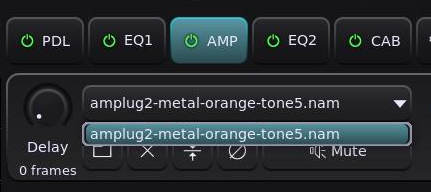
To get the amp to activate I either have to load a different nam file or click on the drop-down and then on the amp listed there, as seen in my screenshot.
Ah got it… As soon as i’m back home i’ll look at it. In the mean time, can you test a prebuilt (deb in xubuntu’s case) see if it will give the same errors?
Unfortunately not until Monday.
But I compiled it on openSUSE-16.0 with gcc-15 and got the same crash, so I very much doubt it’s a compiler or runtime issue.
The standalone binary works fine but since the LV2 error message of course mentions that it’s a plugin definition invalid field, it’s not that surprising.
EDIT : Interestingly enough, the 1.3.0 (with my fixes) does work immediately after an Ardour restart in openSUSE.
That’s with Ardour 9.7-341, though, so I’ll have to compile 9.8.0 and see if there’s a difference there.
The reason it worked (apart from the Amp output level meter; I had to click and select the nam to get that to work) is because I was using it on a stereo track.
When I tried with a mono track the openSUSE version didn’t work either, after an Ardour restart.
So it’s not a distro or tool chain thing but a mono vs stereo track thing.
Since the plugin is mono I believe Ardour internally uses two instances if it’s on a stereo track and that somehow triggers the activation function of the plugin (but still not the Amp meter function, though).
Oh, i know what it is (the plugin def problem) your system is probably using an idiotic locale that thinks decimal symbol is “,” and not “.” - apparently the C function strtof () supports this.
Fixed in 1.3.1
Right click on the plugin in the mixer and under “pin connections” you can change that, single instance will take half the CPU but will effectively make your track’s input mono. (effects afterwards in the chain are still stereo) Mostly in a mix you’d use 2 actual instances panned hard left/hard right, and playing live you’d use the mono sound of your amp into stereo effects like reverb, delay etc.
Well, in those idiotic countries 10 cm = 1 dm and 10 dm = 1 m
In, apparently, non-idiotic countries 12 inches = 1 foot and 3 feet = 1 yard…
And I would think that the European comma predates the American dot.
That being said, 1.3.1 does fix the plugin crash.
But the plugin still doesn’t work on mono tracks after reloading, so you probably need to look into that as well.
Because the issue isn’t that a stereo track will (perhaps) use a bit more CPU, but that one has to re-enable the plugin for every mono track after a restart and seeing as it is guitar plugin for DI audio I’d expect most users would use it on a mono guitar track.
It was just a coincidence that I didn’t have a mono guitar track available on my openSUSE PC and used a regular stereo audio track to test with instead.
Oh, i thought it was the other way around. Anyway here in eastern / french part of canada (montréal, québec) we gen-x’ers got taught the decimal “,” in school by political zealots that tried to brainwash us against the english language / english speaking people. A common mentality of those days to which i never adhered much.
For the plugin going silent after a restart, you mean reloading an ardour session, and the standalone works as expected, right? Does it fix if you move or delete ~/.config/neuralblender/config (or the whole directory)?
Yes, the main issue from the beginning (or at least when I started testing it) has been that when I reload a session the Amp section of the plugin doesn’t work until I either load another nam file or explicitly click on the preselected one in the drop-down list.
Unless it’s on a stereo track, in which case it does work immediately after a session reload.
I have tried removing the config file in between reloads, when I noticed that it doesn’t update the search path when I install the new version to a different location, but that doesn’t seem to make any difference.
I compile programs to /opt/programname-version and then use ‘stow’ to create symlinks in /usr/local. That way I can go back and forth between versions if I want to check for regressions and it’s also much easier to uninstall old versions by simply un-stowing the symlinks and ‘rm -rf /opt/programname-version’
Since the plugin appears to work with a stereo track I doubt the config file makes any difference. It’s probably something which doesn’t trigger correctly when a single instance is run.
I also tried adding two mono tracks, adding the plugin to the first one, saving the session and reloading it, adding the plugin to the second track and reloading the session.
It worked on the first track but not on the second one.
So it seems like if the last track you add the plugin to, before saving, is a mono track then that track won’t have the Amp section working.
And when I then added a stereo track, put the plugin on that one and restarted the session all three tracks had it working!
But neither the Amp input meter nor its output meter on that last stereo track worked, even though the plugin itself worked.
So there’s definitely something fishy with the initialization of the different Amp functions.
I think i fixed it. There was a potential race condition in the plugin’s activate () function and the function that handles mute states of all lanes. Can you test 1.3.2 1.3.3?