The log is written into /tmp/lsp-lv2ui.log.
Looks like second call of the glXQueryExtensionsString call returns NULL on your system. That’s strange and looks like a driver bug. Do you use XWayland or pure X11?
Please consider applying this patch:
I tried both (at login chose plasma-X11, also tried plasma-Wayland). With the patch applied, everything seems to work fine again, though.
Thank you very, very much!
I also need to ask you to check that plugins do not fall-back to Cairo.
You can see the rendering subsystem used in the About dialog.
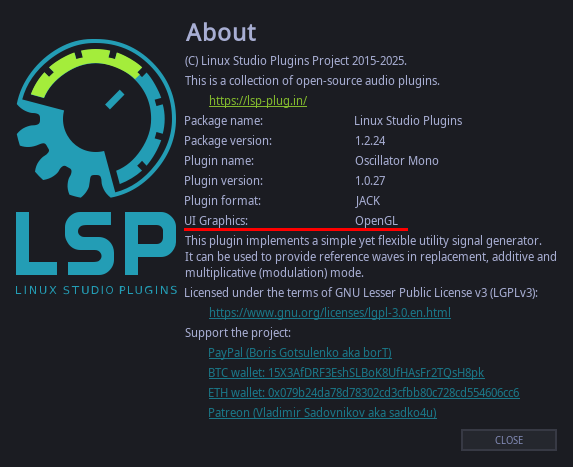
It says openGL  Thanks again.
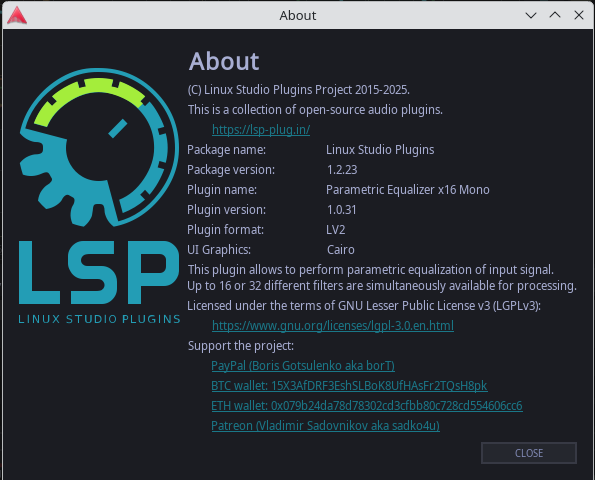
Your screenshot shows Cairo
Aah, ok. I did’t look close when I made the screenshot. At the first call it shows openGL, but at the second call it shows Cairo. I didn’t notice that.
That’s bad. Seems that I need to remember the result of the first call of glXQueryExtensionsString because it badly behaves on your system. An upstream bug of x11?
@werner.back I added some code to cache the result of glXQueryExtensionString here:
Please check that you don’t fall-back to Cairo with this patch.
2 Likes
I’m really confused now. Because I don’t know how to apply those changes to my source tree I simply checked out the whole devel branch and installed it. The good thing is that it stays on openGL now. The bad thing is that I got random crashes all over the place. I could open plugins a few times without an issue, but then suddenly I get segfaults. So I installed master again (the one I compiled yesterday, I just copied the files). Surprisingly now this version ALSO stays in openGL! I don’t know, what I’m supposed to do now…it seems now things are working, but no one knows why 
Yes, bulding from the devel branch with all dependencies fetched should be enough.
Can you provide stack traces for the crash?
gdb output: https://drive.google.com/file/d/1E-CY7IBpirFJV7GsOiTd9Tgfk8_pKbo_/view?usp=sharing
lsp log: https://drive.google.com/file/d/1dwYbwRuAEHw7F64aZbY53aCCksJXgDzL/view?usp=sharing
The behaviour is very confusing atm…not sure if I did something wrong. Now I could use the plugins (devel branch) at first, but it showed cairo again. Then I tried to open the project again and it crashed instantly as I opend the first plugin.
The stack trace is very confusing.
#0  __strstr_sse2_unaligned () at ../sysdeps/x86_64/multiarch/strstr-sse2-unaligned.S:41
#1  0x00007fff3a7bc074 in lsp::ws::glx::check_gl_extension(char const*, char const*) () from /home/werner/.lv2/lsp-plugins.lv2/lsp-plugins-lv2ui.so
#5  0x00007fff3a7bcaba in lsp::ws::glx::create_context(_XDisplay*, int, unsigned long, char const*) () from /home/werner/.lv2/lsp-plugins.lv2/lsp-plugins-lv2ui.so
#7  0x00007fff3a6f0a77 in lsp::LSPString::~LSPString() () from /home/werner/.lv2/lsp-plugins.lv2/lsp-plugins-lv2ui.so
Create context calling from a destructor of LSPString? Seriously?
Please check whether you don’t have conflicting LSP installations on your system.
Also it would be nice if you build with make config ... DEBUG=1 option. This will enable debug information for LSP Plugins.
What I do is to build the plugins with PREFIX=./build so that make install copies the files into the source directory. After that I copy the content of “lv2” to .lv2 in my home directory. I copy the library files in “lib” to /usr/local/lib.
I build lv2 and vst3.
I forgot to copy the vst3 files, maybe that’s the reason for the confusion.
I don’t want to do a “real” install in /usr/local, because I want to have a “clean” version for production.
BTW, do the plugins need the files in lib (liblsp-r3d…)? A while ago I fortot to copy them, but the plugins worked.
Just curious, is there a reason that you don’t use the LSP Plugin binaries from the site? Is this potentially a cause of the variable issues? I rarely bother building stuff when the developer hands me a nice binary to use…
I usually use the binaries, but to help Vladimir I use the git temporarily.
2 Likes
It’s not clear now about are plugins working with recent changes or not.
For me, the devel branch doesn’t work at all. It crashes immediately when I open any LSP plugin. Please use the links from above for debug info, I just updated the files. I compiled devel with DEBUG=1.
@werner.back whoops. Try to update the devel branch and rebuild. Forgot to initialize the field of class with NULL.