The Yamaha has a rec out selector switch that I set to Aux- and a switch for the sound source that I set to Phono. It is possible that it also works with the rec out selector switch on tape 1 or tape 2, but I have not tried this.
I have always selected everything that is not a tape machine for recording via the aux option, e.g. the Tascam DR1 recorder, and it has worked well.
However, I will look at the input options in more detail than before and listen to and evaluate the differences in the recordings.
I recreated it, you are right about the chain: C.E.C. Denky Turntable > Yamaha AX-490 phono input > Yamaha AX-490 Rec Output > RME Fireface UC USB Totalmix > Packard Bell Easy Note with Ardor
I’m confused 
This is the first time I’ve heard the sound of this vinyl through my studio monitors and the sound is of course different from what I heard through my hi-fi system. This confirms what you generally hear or read about the difference between hi-fi and studio monitoring. This recording doesn’t sound so great through my nearfield monitors. It seems that my idea of good drum sound, which I’ve cultivated for years, has gone and I have to approach everything completely differently.
Sorry for OT
Don’t give up if you really like the sound. Maybe quality is there. Try to apply some eq to match the characteristics of your HIFI speakers, play with compression, etc. In Ardour you have lot of possibilities to enhance the sound.
Had similar issue years ago, when tried to sample great drum sounds from obscure 80’s TV show recorded on VHS. It looked like mission impossible at first, but with surprisingly little amount of tweaking in Ardour it produced pretty decent samples which sounded really good in the mix. Still a bit on lo-fi side, but extremely usable, because that ineffable kind of quality survived. Used it many times since then. So maybe just try…
Actually, the Fireface’s preamps on input channels 1+2 should be enough. Not completely sure if the UC has the same preamps as the UCX but I think I’ve digitalized vinyl too when I had a UC.
Inputs 1+2 in the Fire Face are real full level inputs and can amplify up to 65dB, but the mains supply hums too much with this option. I find that the chain works well via the Yamaha and also sounds good.
You can connect a grounds cable from the phono to the little hook at the back of the Fireface and the hum will be gone. Also works quite well with the common grounds strip on some patchbays.
Thank you, that worked, I had to bridge the distance between turntable and Fireface with a simple three meter cable. Of course I don’t have anything like that lying around.
Now I would probably have to apply the RIAA EQ to the recording as recommended by @x42 and @peder. Let’s see what difference there is between direct cabling and via Yamaha-AX490.
At the moment, the recording with direct cabling doesn’t sound bad at all.
Edited: But I can already see that the direct recording has much more pronounced transients. Should the Yamaha already be cutting so much?
I now connected the output of the turntable to the Fireface and recorded the vinyl directly. This worked fine with the Fireface and a grounding cable connected to it. Interestingly, the different record companies seem to use different equalization curves for producing the vinyl cut. Which EQ can boost 30 Hz by +25dB and cut 15 KHz by -14.3dB, for example? The EQ’s I have go max. ±12dB. Which cut equalization have I now captured via the recording directly from the turntable? And which cut equalization curve does my Yamaha amplifier use for the turntable?
Questions upon questions… If anyone has any sources of info, I’m interested.
Each company used slightly different cutting EQ through the 1940’s and into the 1950’s, but in the mid-1950’s the Recording Industry Association of America introduced a recommended standard that all the record companies were using by around 1960.
wiki article on RIAA equalization
Presumably your audio interface has flat frequency response, so you will need to use RIAA EQ either on playback, or more likely process the file so that you can then play it back through flat frequency response equipment.
The term to search for is RIAA plugin. Should be several available, or you can also process using SoX, and I think ffmpeg may have an RIAA filter now as well.
Your Yamaha will use the RIAA standard curve. There are speciality preamps which let you select different EQ curves, but those are for use in playing back records from the first available through mid to late 1950’s. Very few of those original disks are left, so for the most part if you need an adjustable EQ you know it.
There are quite a few articles around on the history of disk cutting and playback equalization. Many of them are quite old, it was a more relevant topic in the peak of vinyl use, or when not quite so far removed from the old disks which had different EQ standards. That Wikipedia article I linked above is a good starting point.
Any disks which need non-RIAA standard EQ would be at least 70 years old by this point, I would think very rare.
If you’re running Ardour 8.2 or older from this site, or your distro’s version, you may be able to use Calf Emphasis; which has a RIAA preset.
I haven’t found any other free/open source plugin with a RIAA EQ.
If you want to do it manually the LSP EQs go from -50 to +20 dB, so you should be able to get an approximation there, and the x42 EQ is -18 to +18 dB.
Thanks Chris, I found a table “Non-RIAA Equalization Data” which mentions different EQ settings e.g. for Teldec, RCA, Columbia etc. I guess that threw my understanding off a bit. And I’ve come to believe that there are different curves for certain genres. And now I also read in the table the years that were all before the 60s. Anyone who can read has an advantage. 
Thanks Peder, I got Ardour 8.2 from this site and the EQ from x42 as well. I can’t use Calf and the LSP plugs because they don’t run on Windows. I can’t use my wonderful AD-DA converters from RME Fireface UC USB with Linux because this device is not supported by Linux, or better now RME does not support Linux.
You can compile LSP for Windows looking at the BUILDING section here
I modified the process slightly, as seen here
There appears to be some slight issues with running the plugins, as seen in the subsequent posts in that thread, but it should work reasonably well.
You can compile LSP for Windows
Maybe I’ll do that someday, but right now I’m busy getting to know Mixbus and my musicality.
I have the beginner’s luck to have a ‘digital’ live recording of 13 tracks; a set of seven songs played by my band at the Berlin club “Aufsturz” in 2008 as a learning project. This multi-miked recording offers everything you need to get to know a DAW and your own musical character in terms of sound.
Edit: In terms of the vinyl RIAA curve, your reference to the x42 EQ was a good one! I use the x42 EQ on the drums and I’m amazed at how low it goes.
ZamPhono is available for free and may be of help to you. Hitting the ‘Reproduction [Play an LP]’ button changes to ‘Production [Cut]’
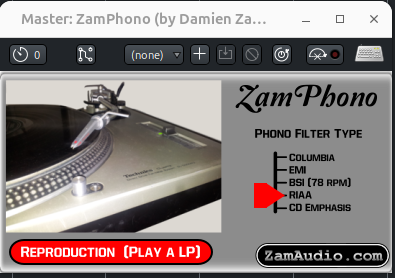
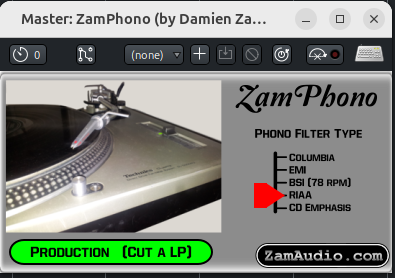
Here is the link for the downloads. They are available for Win64 bit as well. There are plenty of other worthwhile plugins included. ZamMaxim2 is noted by the author as being one of the best in the series. Zam Audio Homepage
2 Likes
Many thanks for your research. Now that I have two built-in RIAA curves, one in the “Yamaha AX-490” turntable preamplifier and the other in the “Zam Phono” plug-in, I can now compare them.
When I listen to the direct recording from the turntable > RME with the “Zam Phono” plugin connected upstream, it has less treble than the recording from the turntable > Yamaha AX-490 > RME.
What makes the difference?
1 Like
What is the input impedance of the RME? Phono cartridges are designed with the expectation that the input of the preamp is 47k Ohms, with capacitance which varies by model of cartridge. 47k Ohms is the standard for moving magnet cartridges, moving coil cartridges typically are designed for very low input impedance, on the order of 100 Ohms, but I don’t believe there is as much standardization as for moving magnet.
If you use a microphone amplifier with a typical 1.5k to 2.5k input impedance the inductance of the cartridge interacting with the input impedance of the preamplifier will cause a drop in high frequencies.
With a standard audio interface the best choice would likely be using the instrument input, and place a separate resistor across the input in parallel to bring the (typically 1M Ohm) input impedance down to the 47k moving magnet phono standard.
Ahh, thanks for the information, I used the first two inputs via jack sockets, and according to the manual they are 8kOhm balanced. But now I’ve also realized that this approach is not any easier for the normal case.
not sure if helpful here, but I use for vinyl a lot for vinyl mastering and for kind of a “preview” of how the record will sound when played back when adding groove wear while playback (not for rendering though) ToVinyl4 | Airwindows