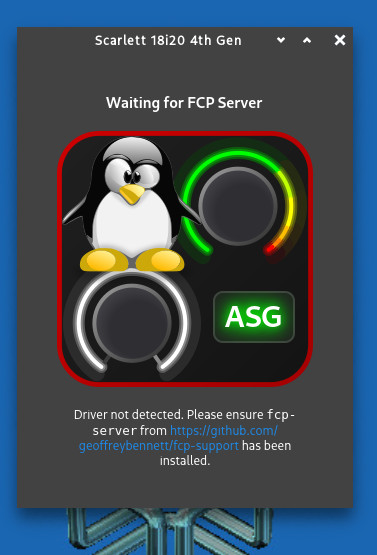
Yes, I’ve already tried that, but it gives me an error!
$ sudo ./scarlett2-firmware_1.0.deb
./scarlett2-firmware_1.0.deb: 2: Syntax error: newline unexpected
I’m going to try compiling the snd-usb-audio-kmod-v6.14.2-f8 kernel modules.
Yes, I’ve already tried that, but it gives me an error!
$ sudo ./scarlett2-firmware_1.0.deb
./scarlett2-firmware_1.0.deb: 2: Syntax error: newline unexpected
I’m going to try compiling the snd-usb-audio-kmod-v6.14.2-f8 kernel modules.
You need to do sudo dpkg -i ./scarlett2-firmware_1.0.deb or gdebi-gtk ./scarlett2-firmware_1.0.deb — the latter should prompt for authentication when installing. Or…just double-click on the deb file in your file manager!
I expected the MIDI to be class compliant and work right away.
What output do you get from the command aplaymidi -l
?Playing MIDI works, but my axiom25 isn’t sending a signal.
I’ve compiled the modules and received and installed this firmware scarlett4-firmware_1.0.deb, but the GUI still isn’t ready to start. It’s the one for the 3rd generation, after all.
The GUI supports 4th gen as well, so that’s not the issue. If the driver isn’t detected, perhaps you have to do a modprobe?
How can I find out the name of the module? lsmod shows me many.
Sorry, looks like fcp and scarlett2 are both already in the kernel according to this. According to this repo, did you do the following?
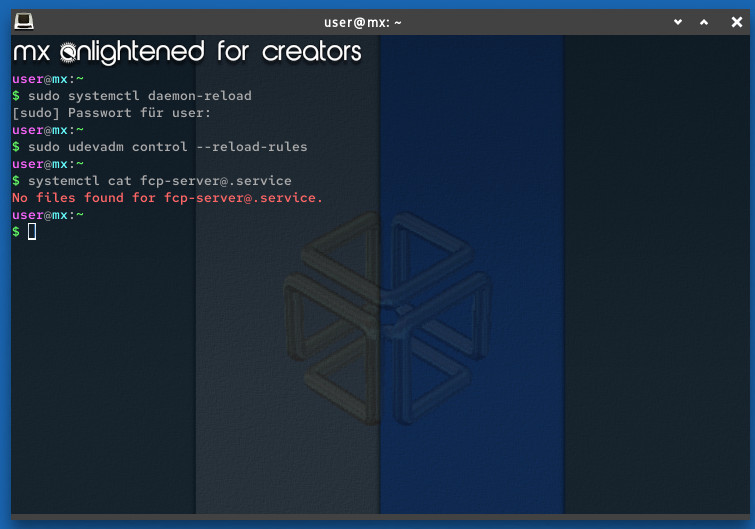
sudo systemctl daemon-reload
sudo udevadm control --reload-rules
If so, what’s the output of systemctl cat fcp-server@.service? And if you hit tab after the @, does it auto-complete to a number (1,2,etc) as the repo suggests? What is the status of that invokation of the template?
You ran sudo make install on the fcp-support repo after building?
I simply followed these instructions, nothing else.
Okay, so…I’m pretty sure you manually installed not necessarily the wrong thing, but something unnecessary (if your device is being deteced already, then the driver is probably already okay). Instead, you should install fcp-support.
Yes, I see in the user manual now that MIDI is intentionally disabled:
"In Easy Start mode, the interface functions at up to 48 kHz sample rate; once you install Focusrite Control 2, you can work at sample rates up to 192 kHz.
The MIDI input and output are also disabled, while Easy Start mode is enabled."
The manual indicates this alternate method to disable Easy Start mode:
If your Scarlett 18i20 is still in Easy Start mode, or you have chosen not to install Focusrite Control 2 to disable Easy Start Mode:
Your Scarlett powers on with Easy Start disabled.
Okay, I’ll have to take a look at that first. Thank you, my head is  buzzing and I’d like to continue tomorrow.
Thank you so much for your dedicated help.
Jeez!
Is there something I can be adding to AV Linux to make this easier? This seems like 15 years ago difficult! AVL always has a recent Liquorix Kernel, and MX Linux keeps up to date with Liquorix releases so a current Kernel is always an install away, there should be no need for a backport Kernel… I would think this should be install and go on an current Debian release… (although I really don’t like that GTK4 was used for the UI).
I have a 3rd gen Scarlett, which doesn’t need fcp-support, but I think that’s something to package (ideally probably upstream Debian should do it, but that’s a different point). I think the drivers are fine, but the FCP stuff isn’t available in the repos.
I should note here that the scarlett2 driver (which should be available on the latest kernels anyway) supports a ‘basic’ interface to the 4th gen devices, but to get full functionality/customizability within alsa-scarlett-gui, you need fcp-support et al. @geoffreybennett, please correct me if any of this is wrong — I’m mainly going off of what’s in the repos haha 
Also may want to package the firmware.
It seems that the firmware list for 4th gen interfaces is shorter than for 3rd gen devices. Any idea why? Hopefully because there are no updates for 18i20 yet and not because it is not re-distributable for some reason.
I honestly don’t know! I haven’t touched the firmware on my 3rd gen 4i4 b/c “It Just Works” lol. I might upgrade it if there is some compelling reason to, I guess…
Keep in mind that all the extra driver and utility programs are (per the project page) only needed “to access device-specific features (like direct monitoring, hardware mixing, custom routing, and level meters).”
The very first sentence on the linux-fcp project page states “Focusrite USB audio interfaces are class compliant, meaning they work “out of the box” on Linux as audio and MIDI interfaces.”
So if you just want to get started recording and playing back audio and MIDI without complex routing and mixing in the interface then you just need to follow the instructions I posted earlier from the user manual to get the interface out of Easy Start mode.
I’ve done this starting procedure before, but I’m not sure if I had the stamina for it. I’ll try again later.
I’ve now managed to disable Easy Start mode. In any case, Scarlett starts differently, without the level indicators lighting up, etc. The lock icon under the USB symbol is now white, and there’s no sound coming from the speakers. Scarlett probably needs FCP support now. I can’t find @geoffreybennett’s GitHub page, or rather, I can’t figure out the things I, as a regular user, would need to install. A ready-made package would be really great from the package providers.