General MIDI is not a plugin, it is a convention, an addition to the original MIDI 1.0 specification about organization of sounds so that you can expect a piano sound on program numbers 1-10 and so on.
This is used for external hardware synths, and I don’t know exactly how it plays a role for software instrument plugins.
The actual plugin your MIDI track uses for sound generation can be seen, edited and changed via Ardour’s mixer strip, in the black processor box.
And options for how a track deals with recording/playing back MIDI data (interpret the inherent channel etc.) can be changed via the context menu in the track header, (channel selector… and patch selector… specificially). The Ardour reference manual should describe all this in detail.
That is fairly simple to explain: In the General MIDI standard Channel 10 is reserved for percussion! (This might also help your understanding: https://en.wikipedia.org/wiki/General_MIDI)
Yes, but there is also a plugin called “General MIDI Synth” that comes with Ardour. On most screens it’s probably cut short on the mixer-strip as “General MIDI…”
Ardour’s “General MIDI Synth” is a software synth that confirms to the GM/GS MIDI specs and provides all GM-compatible instrument sounds. For the case at hand:
Thanks for the responses, General Midi channel 10 is drums, got it, even though it says something different…
General Midi is not a plugin, it is a convention… got it… except General Midi synth is a plugin… got it…
Have to select a midi note on the track, hover the mouse cursor over it in internal edit mode to display which midi channel it is using… got it…
Hard to see why I was getting so confused…
I think you still have some lingering confusion caused by one aspect of the way MIDI works.
Channel information is part of every MIDI event (well, certainly note on/off and controller events). Tracks contain regions, regions contains events, events specify channels. Notice from this relationship that there’s no ironclad relationship between the channel specified in a MIDI event and the track the event is found in.
There is no “track channel” in Ardour. We may add one in the future, but right now, there’s no property of a track which says “this track uses MIDI channel N”. This is because there is nothing in the MIDI specification that requires all the events in a single track to use the same channel.
For some workflows, it makes absolute sense for there to be only 1 channel used by all events in a track. For other workflows, this would be a crippling limitation, and users will absolutely want events using more than 1 channel in the same track. Example; a multipart MIDI file which (for whatever reason) you want to edit / process in the same track. Piano on channel 1, pad synth on channel 2.
Next, the proviso: there is a way to force Ardour to change the channel of an event during playback. You can access by right clicking in the track header and navigating to “Channel Selector”. This will let you do all kinds of “fun” things with channels.
Next, another proviso: you can also use a MIDI filter plugin to change the channel of events too.
Finally: consider that some other DAWs (e.g. Ableton Live) completely ignore MIDI channels entirely, and act as if there is only one.
Thanks for the detail Paul, and others for their input. Realized I came across with more attitude than intended, was getting frustrated at spending way more time fighting with the software rather than making any music…
Paul, I am still not getting a clear picture of how the midi works, but I can see that it is highly flexible in Ardour. My thinking is perhaps coloured by my past experience with cubase where midi channels were assigned to tracks. Maybe it would help to explain exactly what I did…
I imported a midi backing track (Terminal Frost, Pink Floyd) so I could have a go at the guitar solos and practice messing around with midi sounds. When it was imported, it defaulted to General Midi synth for the midi tracks. Certainly with this GM synth, each track seemed to have a midi channel assigned to it and when I try to change the sound it would only allow me to do that with a specific midi channel.
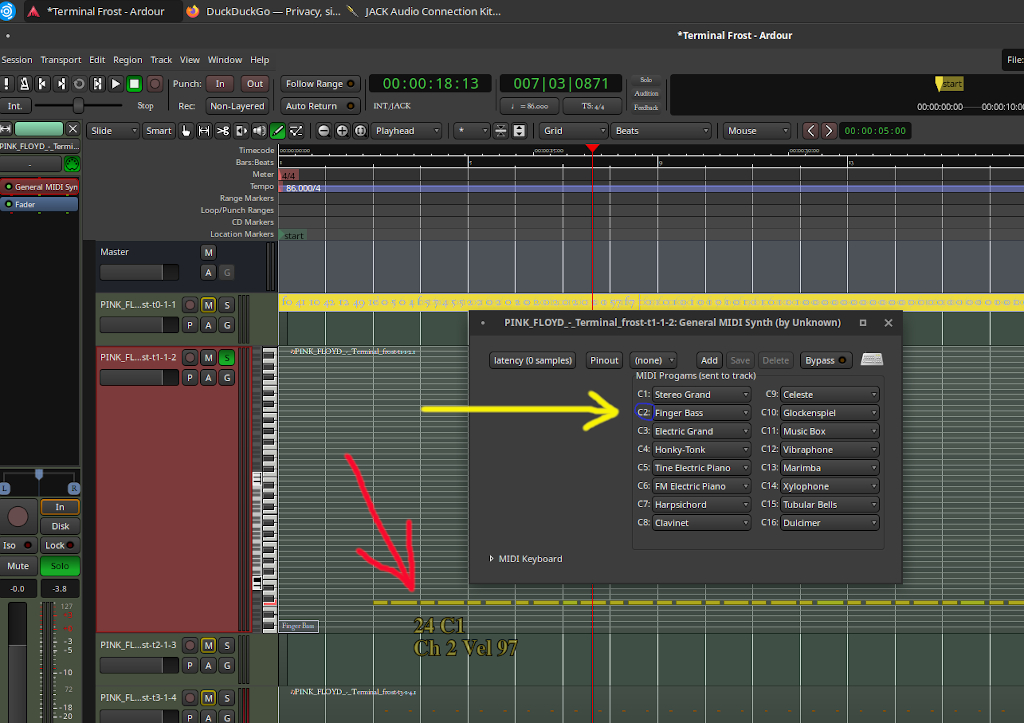
As you can see from the above screenshot, when I try to change the sound in GM synth, I can only do it for channel 2 (yellow arrow), changing any other channel does not change the sound. Thanks to Mark, I now know that hovering my cursor over an already written midi note (red arrow) allows me to see which midi channel is the one to change in this track. To me, it would make more sense for the midi channel (blue circle) to be highlighted in some way, it would then be instantly obvious which channel goes with which track. If no midi notes were written to this track yet, I cannot see how I could know which channel to change, which is the place I was at when I started this post…
But I confess that this is still not intuitive to me yet and it is clear I need to understand more about this. I have tried changing each midi track, one by one, over to fluid-synth and assigning an sf2 sound that is more to my liking, but have now got Ardour crashing when I try to reload the file… At least it has given me something different to fight with, still not picked up my guitar yet though… Any idea where I can find a crash log?
Just to dispense with the last question first: there is no crash log. If you need/want to debug Ardour: http://ardour.org/debugging_ardour
The problems you’re facing now are, as far as I can tell, just workflow related.
Recall how I’ve explained the difference between splitting all the data that uses a given MIDI channel into it’s own track, versus keep all the data for all channels in one track?
You’ve picked the former (which is fine). You’ve ended up with multiple MIDI tracks, each one with its own instrument plugin (the builtin General MIDI synth). That plugin only gets data from the track that it is in. So, if the track only contains events using channel 2, changing what the instrument plugin for that track does with events using channel 3 will have no effect - all those events are in another track, along with a separate instance of the General MIDI synth plugin.
For this kind of workflow, you may prefer to use the concept of a MIDI bus. You would remove the instrument plugin from every MIDI track. Create a MIDI bus. Connect the outputs of each MIDI track to the input of the MIDI bus. Add the General MIDI synth to the MIDI bus.
Now you’ve got a single instance of the plugin handling all the tracks, rather than multiple instances of the plugin, each one handling the data (and thus channel) for a single track.
Neither of these workflows is more “correct” than the other. It depends on what you’re trying to do now, what you might want to do next, and other aspects of your overall working style.
and just to follow up on this. As mentioned previously, Ardour does not assign MIDI channels to tracks. If you have no notes in a track, the track has no channel information/data. We might or might not change that in the future - it’s another case of where both approaches (“track has a defined channel” and “track has no assigned channel”) have their merits for different workflows.
Can see why that flexibilty is so useful in Ardour, and that there are benefits to have multiple methods of doing these midi events. I can also see that a midi bus could be the answer to my problems, although I am not particularly wedded to GM synth as there are a limited set of sounds in it, I like using other synths with soundfonts as I have now amassed a large library of sf2 files…
Have had a quick look at midi bus in the manual but think it must be getting late as my brain is starting to dribble out of my ears… Will take a fresh look at it in the morning and see if I can make something happen in that direction… Thanks again for your time…
Going to have to do a fair amount of work on understanding the midi bus process. I understand audio busses just fine but this will be a new layer of complexity to me, will report back when I have made some progress…
Have watched hours of youtube guides, spent a fair amount of time searching the net, hours chewing through the manual and have got nowhere. I cannot seem to find any sort of setup that you describe Paul, no guides to creating a midi master bus, or any way of using a midi bus to do what you suggest.
I still have difficulty accepting ‘Ardour does not assign MIDI channels to tracks’ as you have stated, is the midi channel assigned to the region? or the midi notes? As I have shown in the pic (with the arrows) there is clearly a midi channel being used in the track I am trying to edit, none of the other midi channels do anything for that region/track/midi notes, only that one midi channel (channel 2) does anything. I have tried to create a midi track/region but then cannot find how to manually change which midi channel is being used for any notes I create, seems to do it randomly.
I had recently persuaded a couple of friends to try Ubuntu Studio with a view to using Ardour but we are all stuck on this midi issue and none of us can make any sense of it, nor can any of us find any guides to help.
Many thanks all… Although most likely simple for you guys, that bit of info from Piergi unblocked the log-jam for us and we all have managed to get going again in the way that we wanted…
Einstein was an accomplished violinist, but knew nothng about MIDI.
MIDI wasn’t designed by musicians, for musicians. It was designed by engineers for people who think like them. If you’re not one of those people, yes, this stuff can be confusing. If you are one of those people, it’s not really confusing at all.