Dynamic of audio samples

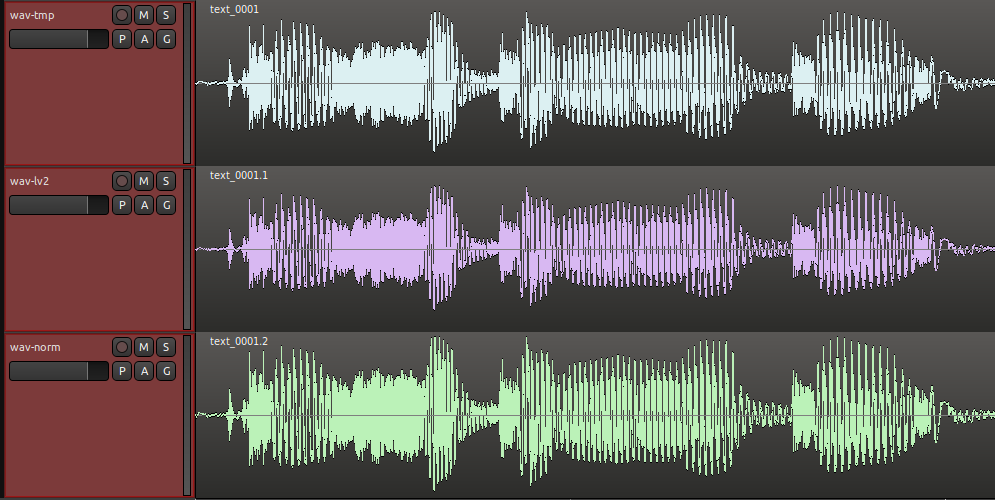
If levelling (where the volume is the same across the whole file) is really what you want - and I’m not sure you do with decaying samples like piano - there is a tool I commissioned for this exact purpose. It’s CLI so you can run it from a bash script to quickly loop over lots of files. It requires compiling and takes a bit of experimentation to get satisfactory results - GitHub - sadko4u/spike-bender: Loudness maximization tool

What I suspect you want is the volume of the notes to sound consistent across the range of the instrument? If so then I haven’t found an automated tool that can help you. Even if the dB value of two notes is the same, it doesn’t mean they will be perceived at the same volume by the listener.

What I do is normalise my samples, then I map them in my sample player, then I play them back manually with my keyboard and adjust the volume of each one, within the sampler, until they “sound” balanced.

Yes, it is.

Yes, that’s what I’m doing. A bit like to tune a piano, only that I adjust the dynamic by listening to each note.

1 Like

In which case completely disregard my comment about compressor/expander processing. Not relevant for this at all.

I think Paul’s answer is the right one, you need to compress your audio. You can do this in batch using ffmpeg. Here is some good documentation:
https://mim.mbirgin.com/?c=posts&id=172

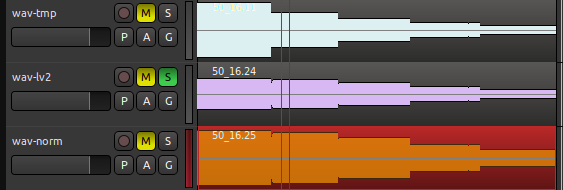
Here is a script that does both compression via a lv2 plugin then normalization with sox:

REP_IN=./wav-tmp
REP_LV2=./wav-lv2
REP_NORM=./wav-norm

for filename in $REP_IN/*.wav; do
  echo "Convert from: $filename"
  fbname=$(basename "$filename")
  echo "To: $REP_NORM/$fbname"

  #LV2 Calf compressor but u can use the plugins you want 
  ffmpeg -i $filename -af "lv2=http\\\\://calf.sourceforge.net/plugins/Compressor:c=\
  ratio=3|\
  threshold=-12.0" $REP_LV2/$fbname

  #Sox normalization
  sox $REP_LV2/$fbname $REP_NORM/$fbname norm -1
done

too bad, even if I changed the compression level of the plugins in ffmpeg, the signal is not more compressed… See for another solution than ffmpeg for batch processing.
PS: The lv2/ffmpeg solution will work if you build yourself ffmeg with --enable-lv2

If it doesn’t work with lv2, try with the built-in ffmpeg compressor: acompressor
A more détail post here: audio - How to use "compressor" with ffmpeg - Super User

#!/bin/bash

REP_IN=./wav-tmp
REP_LV2=./wav-lv2
REP_NORM=./wav-norm

for filename in $REP_IN/*.wav; do
  echo "Convert from: $filename"
  fbname=$(basename "$filename")
  echo "To: $REP_NORM/$fbname"

  #LV2 Simple compressor 
  ffmpeg -i $filename -af acompressor=level_in=1:threshold=1:ratio=6:attack=200:release=1000:makeup=1:knee=2.82843 $REP_LV2/$fbname

  #NORMALISATION
  sox $REP_LV2/$fbname $REP_NORM/$fbname norm -0.1
done

I would be tempted to level the notes initially, and then apply a compressor to the bus to even out the notes in the final result.

I’m making a lot of assumptions here about your use case.

@atux perhaps you can describe what you are trying to do, and we can give views on potential workflows.

For instance, are you trying to create a virtual instrument using samples, such as a soundfont? In which case you would be trying to adjust a set of samples to load into a soundfont instrument editor like Swami or Polyphone, and this would be a one-off exercise to get the samples set to the right levels.

Or are you trying to do something else?

You briefly mention using MIDI, but in what context?

Why is this a problem? If you are building a soundfont or other virtual instrument, I would have thought this is what you wanted.

As you can see, understanding the context would allow us to help you better.

By the way, in the sox command I gave you, the -0.1 means -0.1 dB. If you want some other level, change the number. For instance, the following will level the files to -3dB:

for file in *.wav; do sox "$file" "n_$file" norm -3; done

Cheers,

Keith

The solution with ffmpeg works, the problem was that the threshold must be between 0 and 1 and not in dB…
This solution works:

#!/bin/bash
REP_IN=./wav-tmp
REP_LV2=./wav-lv2
REP_NORM=./wav-norm

for filename in $REP_IN/*.wav; do
  echo "Conversion de: $filename"
  fbname=$(basename "$filename")
  echo "Vers: $REP_NORM/$fbname".

  #LV2 Calf compressor
  ffmpeg -y -i $filename -af "lv2=http\\\\://calf.sourceforge.net/plugins/Compressor:c=\
  bypass=0.000000|\
  level_in=1.000000|\
  threshold=0.125000|\
  ratio=6.000000|\
  attack=0.000000|\
  release=250.000000|\
  makeup=1.000000|\
  knee=2.828430|\
  detection=0.000000|\
  stereo_link=0.000000|\
  mix=1.000000" $REP_LV2/$fbname

  #Sox norm -3dB
  sox $REP_LV2/$fbname $REP_NORM/$fbname norm -3
done

image

1 Like

Thank you.
How does your script code change if I use “acompressor” instead of “lv2”?
Thank you,
a.

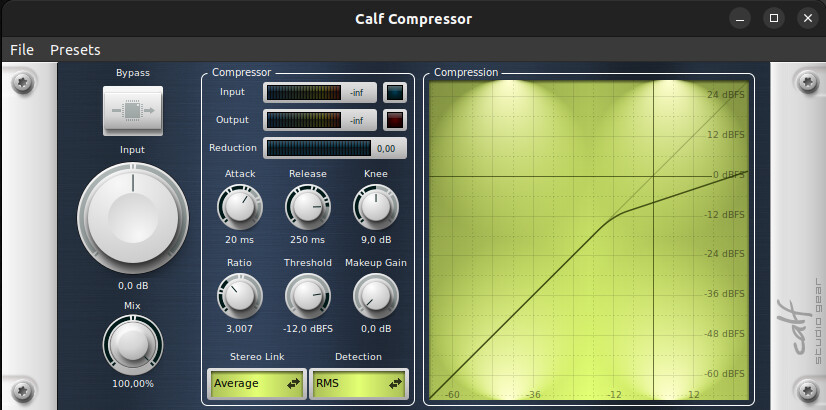
The acompressor solution uses the ffmpeg compressor, the second solution uses the lv2 calf Compressor plugins. They are both compressor-type audio processing which allows the dynamics of the signal to be managed. The important thing is therefore to master the important parameters (Ratio, threshold and the others but these are the main ones). First of all, if you are not familiar with this type of processing, you should do compression tests to familiarize yourself with these tools. Afterwards you will adjust the batch according to what you want to do.

I don’t know if you’re on Linux but if so here’s what you can do (You can probably find an equivalent under other os), you launch the plugins with jalv (A command line host)

jalv.gtk http://calf.sourceforge.net/plugins/Compressor

The plugin launches, you can then run your audio files one after the other to adjust an average level of compression that you will apply to all your files.

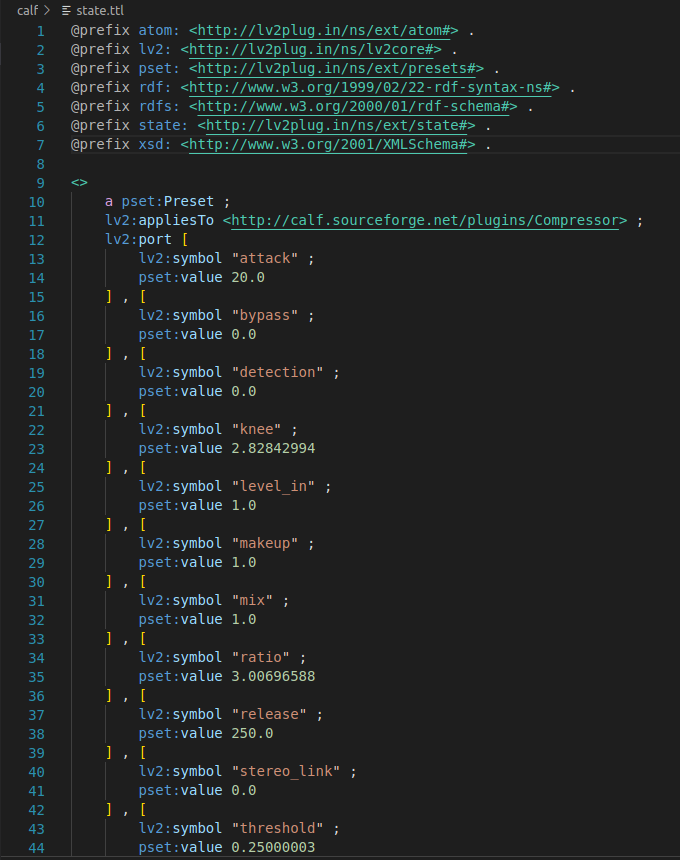
Then you save the compressor setting, and you will find the parameters to apply in the script (File → Save).

What you save is in fact a directory containing two files, edit the state.ttl file, you will find the current plugin settings there:

Maybe there’s a misunderstanding… in Ardour I already use compressors of various types.
The problem was that your script gave me this error:

:~/TEST$ ./test
Conversion de: ./wav-tmp/*.wav
Vers: ./wav-norm/*.wav.
ffmpeg version 6.1.1 Copyright (c) 2000-2023 the FFmpeg developers
  built with gcc 11 (Ubuntu 11.4.0-1ubuntu1~22.04)
  configuration: 
  libavutil      58. 29.100 / 58. 29.100
  libavcodec     60. 31.102 / 60. 31.102
  libavformat    60. 16.100 / 60. 16.100
  libavdevice    60.  3.100 / 60.  3.100
  libavfilter     9. 12.100 /  9. 12.100
  libswscale      7.  5.100 /  7.  5.100
  libswresample   4. 12.100 /  4. 12.100
[in#0 @ 0x557f43ea5480] Error opening input: No such file or directory
Error opening input file ./wav-tmp/*.wav.
Error opening input files: No such file or directory
sox FAIL formats: can't open input file `./wav-lv2/*.wav': No such file or directory

Since you wrote to me: : “if lv2 doesn’t work, you can use acompressor”, I asked you: using acompressor (which I already installed), how should the code be modified.
But maybe it has nothing to do with it, I don’t know. You will be able to understand the error I reported above.
Bye,
a.

The script defined these folders and presumes they exist in the folder you’re currently in

REP_IN=./wav-tmp
REP_LV2=./wav-lv2
REP_NORM=./wav-norm

Either modify the script to point where your wav-files are (the REP_IN variable) and where you want to put the normalized ones (REP_NORM) or make sure you have your wavs in ./wav-tmp and that you have a ./wav-norm where ffmpeg can put the normalized files.

OK, now REP_IN, with the correct path, find the .wav files.
But… REP_LV2 = ?
What is it exactly? where do I find the correct path? I have a lot of lv2…I don’t know what to look for.
[Ardour on Linux]

Thanks,
a.

REP_LV2 is used if you want calf compressed files.
sox puts the normalized wavs in REP_NORM and the calf compressed ones are placed in REP_LV2

So either point that variable to an existing folder where you want those files to end up or do an ‘mkdir ./wav-lv2’ before running the script.

As Peder says, you must first create the three directories where you put the script (wav-tmp, wav-lv2, wav-norm), put your files to process in wav-tmp.
After processing, you will find in wav-lv2 the files compressed via the lv2 plugins, in wav-norm these files after lv2 compression and normalization with sox.

Hi @lherg,

I created 3 folders:

~$ mkdir ./wav-tmp
~$ mkdir ./wav-lv2
~$ mkdir ./wav-norm

I see these 3 folders present in /home, OK.

In the “wav-tmp” folder I put 3 .wav files:

:~/wav-tmp$ ls
B0.wav C1.wav D1.wav

The “wav-lv2” and “wav-norm” folders that I created, however, are empty for now.

In the script there are these paths:
REP_IN=./wav-tmp
REP_LV2=./wav-lv2
REP_NORM=./wav-norm

Now, I run your script, which I saved in a text file with the name “test”:

:~$ ./test
Conversion de: ./wav-tmp/B0.wav
Vers: ./wav-norm/B0.wav.
ffmpeg version 6.1.1 Copyright (c) 2000-2023 the FFmpeg developers
  built with gcc 11 (Ubuntu 11.4.0-1ubuntu1~22.04)
  configuration: 
  libavutil      58. 29.100 / 58. 29.100
  libavcodec     60. 31.102 / 60. 31.102
  libavformat    60. 16.100 / 60. 16.100
  libavdevice    60.  3.100 / 60.  3.100
  libavfilter     9. 12.100 /  9. 12.100
  libswscale      7.  5.100 /  7.  5.100
  libswresample   4. 12.100 /  4. 12.100
[aist#0:0/pcm_s24le @ 0x55e034af0f00] Guessed Channel Layout: stereo
Input #0, wav, from './wav-tmp/B0.wav':
  Duration: 00:00:49.36, bitrate: 2116 kb/s
  Stream #0:0: Audio: pcm_s24le ([1][0][0][0] / 0x0001), 44100 Hz, 2 channels, s32 (24 bit), 2116 kb/s
[AVFilterGraph @ 0x55e034b395c0] No option name near 'http\://calf.sourceforge.net/plugins/Compressor:c=  bypass=0.000000|  level_in=1.000000|  threshold=0.125000|  ratio=6.000000|  attack=0.000000|  release=250.000000|  makeup=1.000000|  knee=2.828430|  detection=0.000000|  stereo_link=0.000000|  mix=1.000000'
[AVFilterGraph @ 0x55e034b395c0] Error parsing a filter description around: 
[AVFilterGraph @ 0x55e034b395c0] Error parsing filterchain 'lv2=http\\://calf.sourceforge.net/plugins/Compressor:c=  bypass=0.000000|  level_in=1.000000|  threshold=0.125000|  ratio=6.000000|  attack=0.000000|  release=250.000000|  makeup=1.000000|  knee=2.828430|  detection=0.000000|  stereo_link=0.000000|  mix=1.000000' around: 
[aost#0:0/pcm_s16le @ 0x55e034b38500] Error initializing a simple filtergraph
Error opening output file ./wav-lv2/B0.wav.
Error opening output files: Invalid argument
sox FAIL formats: can't open input file `./wav-lv2/B0.wav': No such file or directory
Conversion de: ./wav-tmp/C1.wav
Vers: ./wav-norm/C1.wav.
ffmpeg version 6.1.1 Copyright (c) 2000-2023 the FFmpeg developers
  built with gcc 11 (Ubuntu 11.4.0-1ubuntu1~22.04)
  configuration: 
  libavutil      58. 29.100 / 58. 29.100
  libavcodec     60. 31.102 / 60. 31.102
  libavformat    60. 16.100 / 60. 16.100
  libavdevice    60.  3.100 / 60.  3.100
  libavfilter     9. 12.100 /  9. 12.100
  libswscale      7.  5.100 /  7.  5.100
  libswresample   4. 12.100 /  4. 12.100
[aist#0:0/pcm_s24le @ 0x55d7a47f4f00] Guessed Channel Layout: stereo
Input #0, wav, from './wav-tmp/C1.wav':
  Duration: 00:00:49.36, bitrate: 2116 kb/s
  Stream #0:0: Audio: pcm_s24le ([1][0][0][0] / 0x0001), 44100 Hz, 2 channels, s32 (24 bit), 2116 kb/s
[AVFilterGraph @ 0x55d7a483d5c0] No option name near 'http\://calf.sourceforge.net/plugins/Compressor:c=  bypass=0.000000|  level_in=1.000000|  threshold=0.125000|  ratio=6.000000|  attack=0.000000|  release=250.000000|  makeup=1.000000|  knee=2.828430|  detection=0.000000|  stereo_link=0.000000|  mix=1.000000'
[AVFilterGraph @ 0x55d7a483d5c0] Error parsing a filter description around: 
[AVFilterGraph @ 0x55d7a483d5c0] Error parsing filterchain 'lv2=http\\://calf.sourceforge.net/plugins/Compressor:c=  bypass=0.000000|  level_in=1.000000|  threshold=0.125000|  ratio=6.000000|  attack=0.000000|  release=250.000000|  makeup=1.000000|  knee=2.828430|  detection=0.000000|  stereo_link=0.000000|  mix=1.000000' around: 
[aost#0:0/pcm_s16le @ 0x55d7a483c500] Error initializing a simple filtergraph
Error opening output file ./wav-lv2/C1.wav.
Error opening output files: Invalid argument
sox FAIL formats: can't open input file `./wav-lv2/C1.wav': No such file or directory
Conversion de: ./wav-tmp/D1.wav
Vers: ./wav-norm/D1.wav.
ffmpeg version 6.1.1 Copyright (c) 2000-2023 the FFmpeg developers
  built with gcc 11 (Ubuntu 11.4.0-1ubuntu1~22.04)
  configuration: 
  libavutil      58. 29.100 / 58. 29.100
  libavcodec     60. 31.102 / 60. 31.102
  libavformat    60. 16.100 / 60. 16.100
  libavdevice    60.  3.100 / 60.  3.100
  libavfilter     9. 12.100 /  9. 12.100
  libswscale      7.  5.100 /  7.  5.100
  libswresample   4. 12.100 /  4. 12.100
[aist#0:0/pcm_s24le @ 0x5578cf2cef00] Guessed Channel Layout: stereo
Input #0, wav, from './wav-tmp/D1.wav':
  Duration: 00:00:49.36, bitrate: 2116 kb/s
  Stream #0:0: Audio: pcm_s24le ([1][0][0][0] / 0x0001), 44100 Hz, 2 channels, s32 (24 bit), 2116 kb/s
[AVFilterGraph @ 0x5578cf3175c0] No option name near 'http\://calf.sourceforge.net/plugins/Compressor:c=  bypass=0.000000|  level_in=1.000000|  threshold=0.125000|  ratio=6.000000|  attack=0.000000|  release=250.000000|  makeup=1.000000|  knee=2.828430|  detection=0.000000|  stereo_link=0.000000|  mix=1.000000'
[AVFilterGraph @ 0x5578cf3175c0] Error parsing a filter description around: 
[AVFilterGraph @ 0x5578cf3175c0] Error parsing filterchain 'lv2=http\\://calf.sourceforge.net/plugins/Compressor:c=  bypass=0.000000|  level_in=1.000000|  threshold=0.125000|  ratio=6.000000|  attack=0.000000|  release=250.000000|  makeup=1.000000|  knee=2.828430|  detection=0.000000|  stereo_link=0.000000|  mix=1.000000' around: 
[aost#0:0/pcm_s16le @ 0x5578cf316500] Error initializing a simple filtergraph
Error opening output file ./wav-lv2/D1.wav.
Error opening output files: Invalid argument
sox FAIL formats: can't open input file `./wav-lv2/D1.wav': No such file or directory

Am I doing something wrong?
a.
Try using only three \ in after http, instead of the four.
Or maybe even just two.

The different number of \ in the errors “No option name near 'http\://calf.sourceforge.net…” and
“Error parsing filterchain 'lv2=http\\://calf.sourceforge.net…” suggests that the escaping has left stray backslashes around in the actual command that’s been run.

I tried, it doesn’t change, the same errors remain.
a.

No idea then.

Maybe try lherg’s built-in ffmpeg acompressor script instead, to avoid the external lv2 plugin hassle.

In the fmpeg documentation https://ffmpeg.org/ffmpeg-filters.html#toc-lv2 they don’t have exactly the same syntax:
ffmpeg -y -i $filename -af "lv2=p=http\\://calf.sourceforge.net/plugins/Compressor:c=

It works for me both ways with or without the p.

Afterwards I have no more ideas either. try with acompressor.