Aaah… That explains why the odd plugin crashes Ardour, I have so many installed I had just assumed the odd one was twitchy and was a small price to pay for all the goodies I have… Been reading your post merry10, your gpu is a beast of a card, very new too, mine is a gforce1070 and am hoping it may be well supported in AV 23 as its been around for a while, or maybe thats wishful thinking, will know tomorrow… Blizzards and sub-zero weather tomorrow, perfect weather for a day on the PC…
AV Linux hardware support is completely governed by the Liquorix Kernel and what Debian and MX Linux support, AV Linux is built package by package from the Debian (Bookworm) and MX-23 Repositories and these provide the chassis and wheels so to speak. The Liquorix kernel, the nVidia drivers will behave the same across Debian, MX and AV Linux.
With the time that has gone by since the release of AV Linux 23.2 a few things are suggested:
-
Watch the release Video it explains a LOT of details:
https://www.youtube.com/watch?v=Fl5TMM7cViI -
Once you install AV Linux boot it with systemd (the current release inherits the boot choice of systemd or sysvinit from MX) Enlightenment is designed with systemd in mind and will work better with it. Future AVL ISO’s will boot and install to systemd exclusively, and no I’m not a systemd fanboy I couldn’t care less about init systems, I go with what works best.
-
Alt-click is your friend to work with Enlightenment Windows…
-
Things are different than XFCE4 and in different places, commit 10 minutes to getting familiar with where they are and don’t expect it to be something it’s not. People install KDE Plasma and expect and know it will be different than XFCE4. Apply the same logic.
-
People really freaked out that the dock Icons flash when hovered on, I have created a customized default theme that adresses this and a few other issues:
https://forum.mxlinux.org/viewtopic.php?t=82719
Installed AV 23 but XFCE did not install very well, the panel looks like xfce, the whisker menu was a bit like xfce (program search, favorites missing) but that was all… All other menus looked like enlightenment and I really dont like it and find it confusing and non-intuative at best…
So back to AV 21, I realize some programs and plugins may not be the latest version and the odd one might not work at all, but I am much happier with AV 21 and I am going to stick with it.
Thanks for the advice Glen, but AV 23 is not for me and I will stick to 21 which I thoroughly enjoy and get a lot out of…
Is there a newer version of Glibc in the Debian backports so you can use Surge?
Or can you just recompile Surge on the target system so it uses the system glibc?
2 Likes
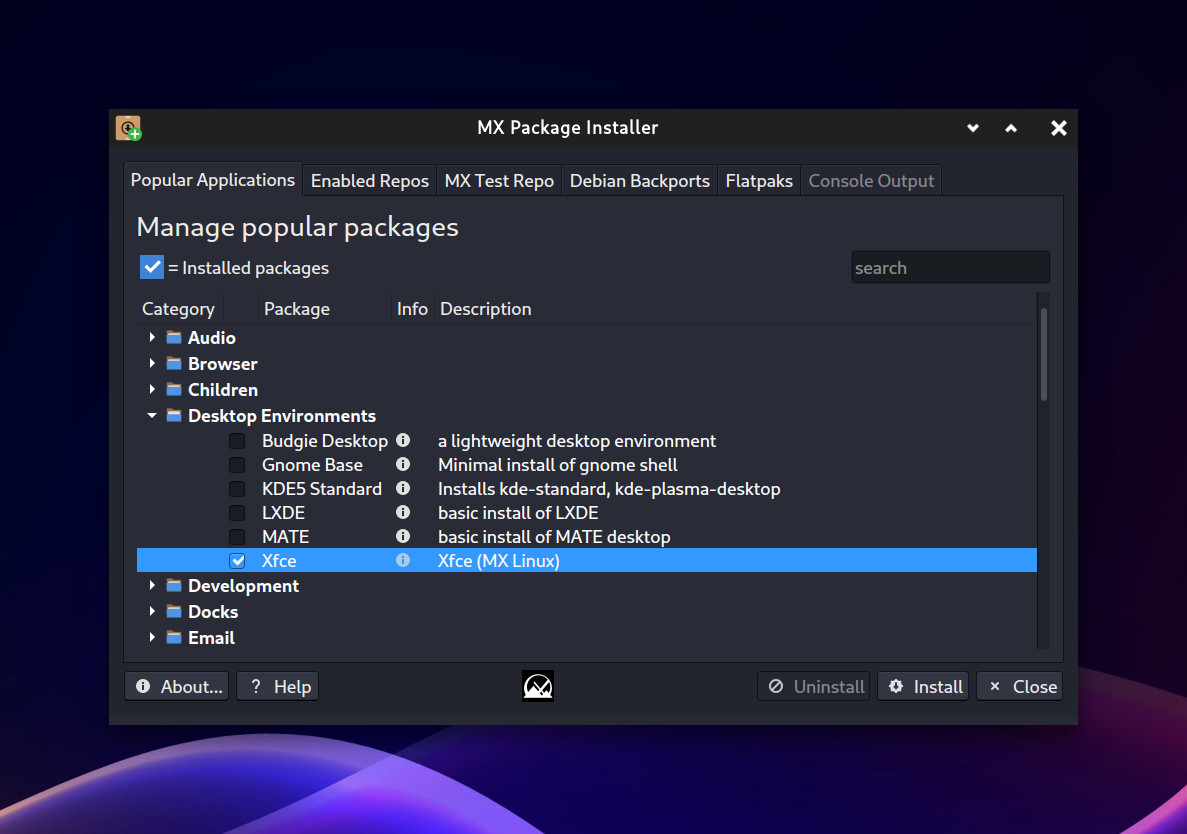
It seems you’ve made up your mind to dislike things before you’ve even installed… It sounds like not all of the xfce4 packages got installed, I think if you install it from ‘Popular Applications’ in the MX Package Installer it basically installs full XFCE4 with the MX defaults.
Thanks for the advice Glen, although as mentioned earlier, I really have tried get get my head around the enlightenment desktop, spent quite a few hours with it and I simply do not like it.
I eventually decided to try something else and have just installed Fedora Jam and popped the xfce desktop on it, so far so good. Installing the nvidia driver is quite a bit more complicated in Fedora, but have been given a guide so that is next on the list of things to do…
So far everything seems to going along nicely, even have pipewire doing its thing, although I am aware of the issues some have with it, it seems to work out of the box at the moment. Thanks for all your guidance guys, I build a lot of PC’s but have never even become semi-compentent with Linux config on a command line level, always looks like a deep rabbit hole to me needing more time than I can spare on it, means I am very grateful when you guys step in and help…
Hope you get your nvidia working properly merry10, nvidia seem to be one of the few stubborn companies that refuse to open source their drivers and they have become one of the biggest businesses on the planet now, probably unlikely to stoop down to us mere mortals and open source for our benefit anytime soon…
Thank you Glen, Ive installed your new theme. You are a hard working generous person. Thankyou fasteddy I will persevere and it will be ok 
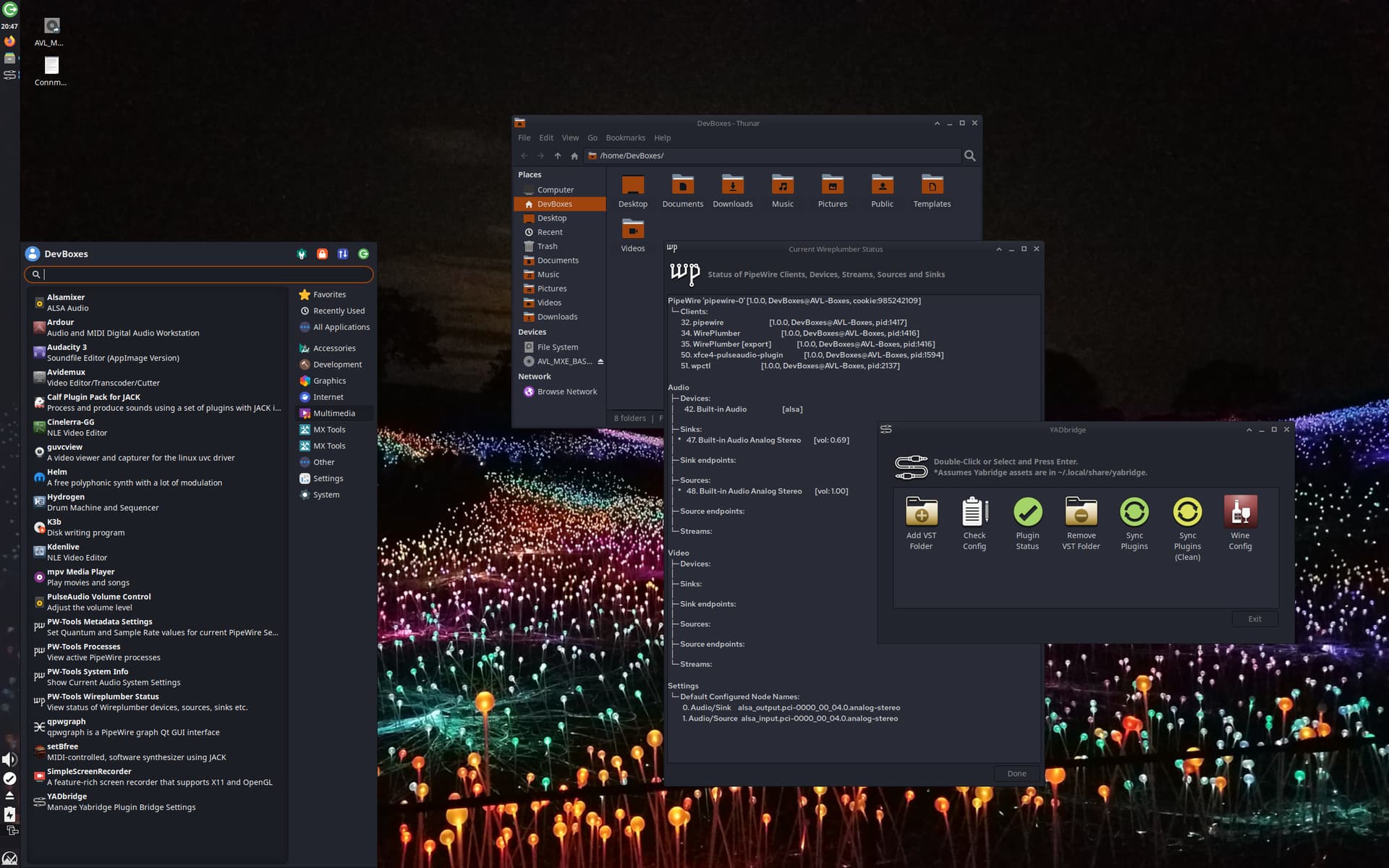
For anyone who may care… I installed a development version of AV Linux 23 in Gnome Boxes, I ran MX-Updater to bring the system up to date then I installed XFCE4 from the MX Package Installer Popular Apps–>Desktop Environments as shown in the picture a couple of posts above. And voila a full XFCE4 DE with some minor details (missing custom Icons here and there and QT stuff not taking the GTK themes (all stuff that can be fixed). So yes, you can install XFCE4 in AVL-23. It will take some fine tuning to make it look as finished as Enlightenment…
1 Like
Wow Glen… I had followed a guide on the net to install xfce (using terminal), certainly did not look like what you have achieved. I have also had similar problems with Fedora Jam which has KDE by default, got xfce in but large amounts of KDE were still active and spent many hours trying to sort that out.
But what you have done looks amazing Glen, have just pinched a hdd from a pc I am building and will use it to follow your example, thank you Glen, your diligence is really quite impressive… Will let you know how I get on…
It worked…! Still have a few twitches with it, whisker menu disappeared even though panel prefs said it was there, still managed to restore it. Synaptic wont run from the whisker menu, but can run it from a terminal.
But everything else seems to be running nicely, far better than when I did this from a terminal following that guide. There seems to be no sign of enlightenment, it is all xfce and I am delighted so far. Still quite a bit of configuring to do so may find one or two bugs but as you said Glen, it all seems fixable…
Just a quick note on Fedora Jam, very helpful folk on the forum, it install nicely and works well. But what was a surprise was how few plugins and apps were available, no kxstudio repo, many other apps and plugins simply are not available. Had started to read how various folk were getting around this but it was starting to look like a lot of work to get even a few of the vast amount of toys that are readily available in Ubuntu and Debian.
Back to playing around with AV 23 for the rest of the day…!
Oh, and merry10, my gforce 1070 installed perfectly (530 driver), no issues at this time although I notice the updates gave me 6.6.12-1 kernel…
What did you find was missing from Fedora? Several years ago Fedora incorporated a lot of what had been kept in Planet CCRMA into the main fedora repositories, so most of the well-known free software audio applications are easily available now.
Yes indeed… (impending rant alert)
I don’t put the kernel metapackages to automatically pull in Kernel updates in AV Linux, I think serially updating a Kernel with regular blanket system updates is absolutely insane… On a system, especially a workstation if (a) your hardware is fully supported and (b) there are no known security or malware issues in your running Kernel what reason could there be to upgrade? Kernels are getting fatter and fatter and flakier and flakier so on a perfectly running OS completely changing all the fundamental code that runs the system routinely makes absolutely no sense to me… That said of course if your hardware isn’t fully supported or some MAJOR new performance enhancement comes along then you may want to try a newer Kernel while keeping old faithful installed but if you have a 5 year old PC that had every piece of hardware supported by Kernel 4.X, installing freshly painted Kernel 6.X will really give you nothing you don’t already have. The potential promise of noticeable performance improvements is often offset by new bugs and kernel quirks… As a benign example how many times has suspend/hibernate been broken in Linux kernels? 
This topic was automatically closed 91 days after the last reply. New replies are no longer allowed.