How did you install the later version of Pipewire?
On my Kubuntu 24.04 installations, I have installed later versions of Pipewire from:
This seems to work well.
Cheers,
Keith
How did you install the later version of Pipewire?
On my Kubuntu 24.04 installations, I have installed later versions of Pipewire from:
This seems to work well.
Cheers,
Keith
Yeah, I’ve used qjackctl before, but on Ubuntu, Jack is not installed by default. Pipewire is the default sound system installed and it uses Pipewire-Jack, so switching isn’t just a matter of running Jack, PW has to be removed or disabled from the system, and that is where things went bad.
I downloaded 1.4.6 source from the main PW site and built and installed it, but I just assumed the default configuration would be good. I didn’t see anything special on the instructions that I needed to worry about, but something was needed. My sound is completely broke now.
I have a feeling PW was already broken from something else though, and that’s why my busses were failing even though everything looked ok. After installing 1.4.6, Synaptic initially showed that 1.0.5 was broken and needed repair until I uninstalled the 1.4.6 version, then everything cleaned up and said it installed correctly, except now when I run wpctl --status, PW core dumps, and any attempt to restart the PW server fails and crashes.
I’ll check out your site when I get things back up and running, though not sure I’ll jump right in with it. I’ll do a lot more checking before doing that final make install step.
No, it does not need to be uninstalled to run JACK.
I too uninstalled Pipewire on Ubuntu , and it was so embedded, it totally screwed up my install. It was horrible. It removed several key packages, including the Gnome Desktop.
Well, I’m pretty sure if you don’t switch out pipewire, qjackctrl will just end up a front end to pipewire-jack. I don’t think you can run two jack servers at the same time. Would not be advisable.
Ubuntu built a tool to switch back and forth between pipewire and alsa. My morning brainstorm was to use the tool to switch back and forth and see if it would find my audio devices, but as usual, it just made things worse.
As mentioned previously pipewire is modular, so you can keep pipewire-pulse for your desktop audio server, but remove pipewire-jack and use jackd as the JACK server for audio production use.
Just pointing out because “switch out pipewire” is ambiguous, and as you point out removing pipewire entirely can often cause problems with your desktop installation. Removing pipewire-jack is usually not as involved, especially if your distribution still provides jackd and has a “switch packages” type of command that will let you swap jackd into the place of pipewire-jack. If not, then removing pipewire-jack may require removing some software which has a JACK dependency, and then re-installing those packages after jackd is installed.
Thanks for keeping me honest. I understand it all conceptually, but I don’t get down into the weeds often enough to fully understand all the details. I really like pipewire and being able to easily configure the audio system, but I’ll need to gain a lot more understanding before attempting to upgrade it again.
Use the repository on that site and it should just upgrade the Ubuntu packages to 1.4.6.
No “make install” required.
Cheers,
Keith
Sorry to sidetrack on this topic, but I have seen this repository before. Does anyone happen to know of one that is friendly to Ubuntu 25.04? Thank you.
@ncfoster Ugh, whod’a thought that Ubuntu plucky would ping pipewire @ 1.2.7! There don’t appear to be any backports yet for plucky. Even UbuntuStudio plucky is still pinned there!
Well, after rebuilding and upgrading, I’m back where I was before I rebuilt. This is my issue:
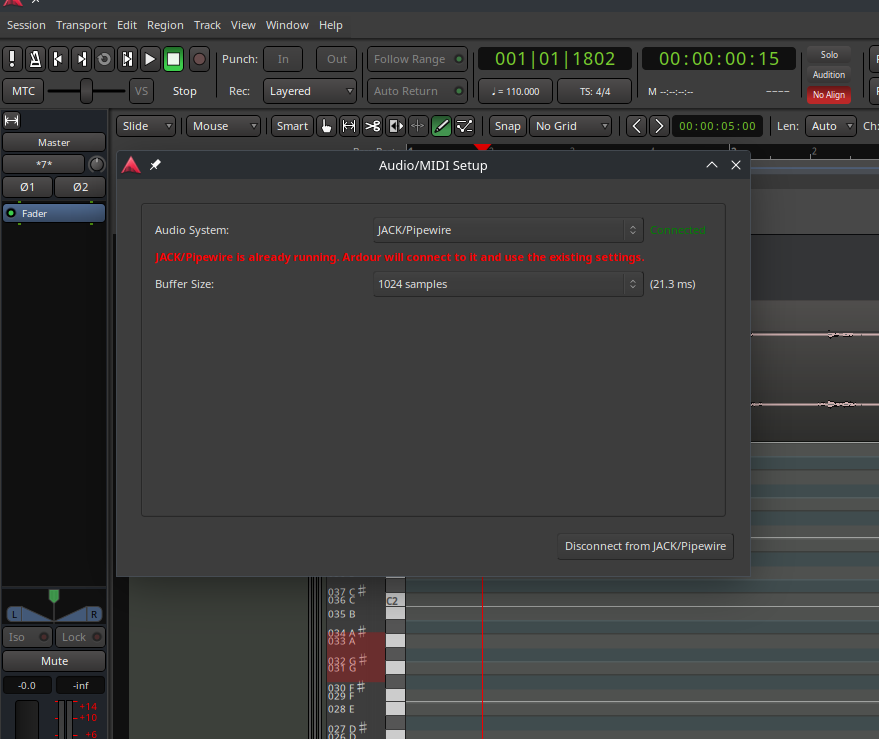
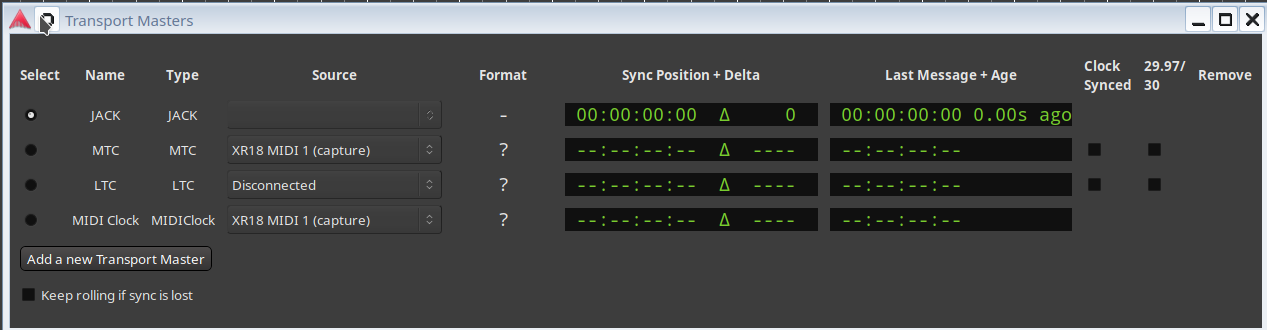
As shown, Jack is in fact running and Ardour says I’m connected, but it’s not working and the button still blinks in green “MTC” and I can’t get it to show Jack. What I’ve done:
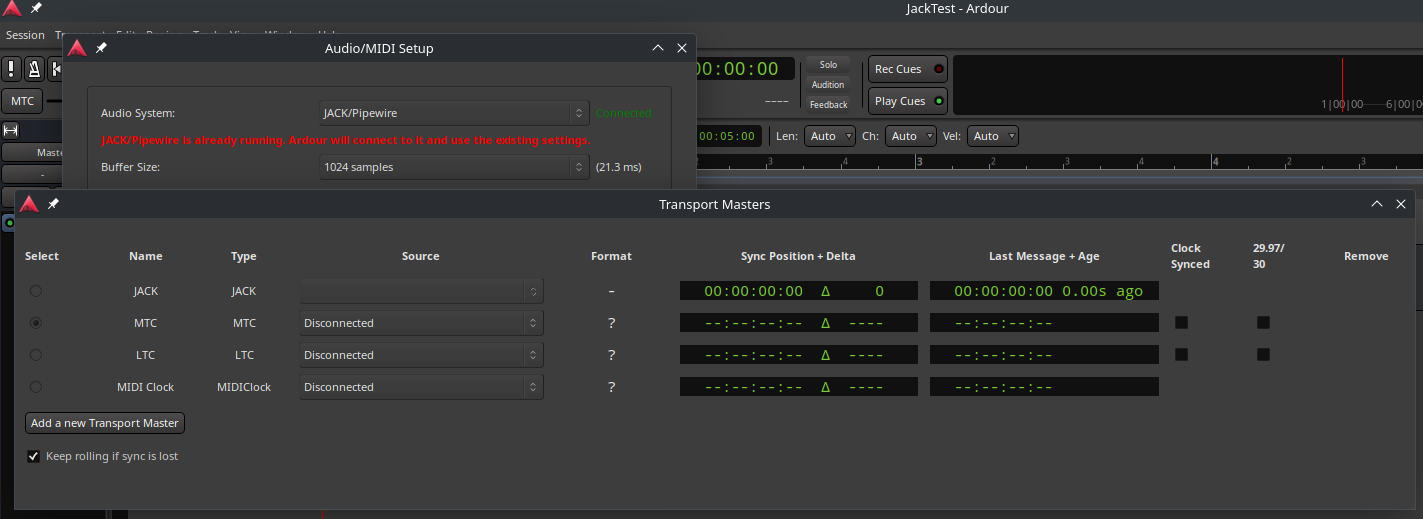
EDIT: Jack shows up on the Transport Masters window, but it isn’t selectable.
I’m stumped. I don’t see anything else to configure, so crawling back here to see if anyone has some advice. The master buss is still broken too when I run in local mode.
This was common in the past when people ran Jack as root and Ardour as a user. Any chance this is a permissions issue in a similar fashion where your user needs to be a member of a particular group in order to access Jack/Pipewire (I don’t use pipe wire so this is just a guess in the dark).
Seablade
It’s not that. Pipewire is a service launched by a user (or on their behalf) at login.
I believe my permissions are set correctly. I’m a member of the Audio group, and my account has root privileges anyway. Set my audio memlock to unlimited too.
What exactly is not working?
That seems like a pipewire-jack specific issue that likely isn’t related to the audio issues.
At least you have never mentioned synchronizing multiple programs to generate part of the audio, and if only one application is in use there is no need for JACK transport control.
What are you referring to as “local mode?” I don’t think that is a term used by ardour.
Then I guess we are back to the suggestion to get a minimal session which exhibits the problem and then zip and upload the session folder somewhere so that someone else can take a look and see if the problem shows up on another system, which would isolate whether you have a session configuration problem or a system specific problem.
The transport. Answering your other question below, I do use Hydrogen for drums, so I need Jack running in the background to sync them up. For this testing though, I’m just running Ardour by itself, but I have tested with Hydrogen too as that usually has to be the master otherwise I have issues with them getting out of sync. I get the same results whether working standalone or with Hydrogen.
The transport issue though only started happening after I first upgraded to 1.4.6 on my old system build, so it’s your fault, Chris, for getting me to upgrade.  Just kidding, but before I did that, I was only having issues with broken busses, though I have a feeling my pipewire 1.0.5 setup was already broken. But now I have this on top of the broken busses, and I’ve repeated it on two systems now. I believe both problems though are symptoms of the same issue, something just isn’t configured correctly. If I run in ALSA mode, the transport does work and the master buss starts working again.
By local mode, I’m just referring to running off of Ardour’s internal clock.
I’m reasonably certain this isn’t an Ardour issue, but a system configuration issue. I’m just not sure where else to go as people who understand both Pipewire and Ardour are here, but if I go to Pipewire forums/help, they probably won’t know Ardour that well.
I may end up just going back to normal Jack and disabling pipewire-jack. At least I understand how that is all configured now. Still would like to stay on pipewire, cause, it’s all supposed to just work, right? Heh, feeling more like a pipedream now.
OK, I confirmed that Ardour 8.12 (official build) allows selecting jack transport when running the JACK backend with pipewire 1.4.7 from the Fedora repository (and transport control actually works correctly).
Both Ubuntu I assume? Perhaps Ubuntu has a broken pipewire build. Were both systems 24.04, or have you tried 25.04?
I can confirm I can select it on Kubuntu 24.04 using Ardour 8.12 and Pipewire 1.4.6 added using the repository I linked above.
To do this I used Edit->Preferences-Chase and select “Show Transport Masters Window”.
Cheers,
Keith
Chris/Keith,
Here is my system:
Ok, how do I say this… the transport is working now. When I took that screenshot just a few minutes ago, and every time I looked at the transport master, Jack was disabled and couldn’t be selected. But I just figured out that it was because MTC was selected with the button on the main panel, and that seems to disable all other choices on the transport master window. When I set it to internal(or LTC), and then opened the transport master window, then I could select Jack as the master. So just me not knowing how the transport window worked. I think it’s confusing that with MTC selected on the main window, the transport master window won’t let you select another one, and if I have Jack/Pipewire selected, it doesn’t automatically select that one, but whatever. Maybe it’s a bug, or something in the way the transport system works that has to be prevented in that way. But the transport seems to be working now.
So now I’m back to the original problem of the busses not working, which a quick test showed that they are still broke in at least one project. But I’m going to shelve that issue for now as I have several other things to work on first before I can get back to it. Spent too much time on this already.
I’m going to rebuild the projects fresh, copy what I can and recreate what I can’t and start over and hopefully it won’t happen again with Pipewire 1.4.6. Fortunately, it’s a stretch to call even call me an amateur musician, so a restart is only costing me a little time.
Thank you all for working through this. Appreciate it and if I do figure out a solution to the broken busses, I’ll post it here.
This topic was automatically closed 91 days after the last reply. New replies are no longer allowed.