Hello, I switch to Linux mint a couple of weeks ago and I’m a complete noob.
The audio setup is really confusing to me with all the different systems and stuff, but I roughly get that it’s just different ways for audio to work.
However, the output device list is the problem. In the input device list my USB microphone and webcam are listed, but my bluetooth headphones aren’t shown in the output device, only things like “HD-Audio Generic”, “HDA NVidia”, “HDA NVidia (hw:NVidia,7)”, my microphone or “USB Audio Device”.
Some of the options make my monitors be the output devices, but none seem related to my headphones.
I saw a thread in this forum where there was talk that using bluetooth devicess with Ardour is not possible for some technical reason. Is there any workaround where I could rewire the audio through another device to my headphones or something like that? Is there anything I could do?
These bluetooth headphones are the only good audio device I have, I won’t be able to do mixing through my monitors lol
The problem with bluetooth is that is has a very long and unreliably latency (delay until you hear actual playback).
If you are only going to mix and need playback only this does not matter… use
- Audio System: Pulseaudio
This uses your desktop’s default sound-system, which is likely bluetooth once the bt headphone is paired.
Greetings and welcome to the fun house 
Robin may well have resolved the immediate monitoring issue but if you still need / want to optimise your setup, more info will be needed.
Are the headphones paired using onboard bluetooth or do you use a USB dongle for that?
Are the headphones being recognised and paired OK? See this for instance.
Abit of further, general info regarding USB mics and Ardour (and audio production generally)
If you can provide a little bit more info about your setup then someone here can advise further, maybe
The easiest and best way to get cracking with audio on Linux is using a class-compliant USB audio interface and connecting all input / output devices to that. Think Behringer, Focusrite, and so on. Dunno if you have one handy though and I appreciate it’s not always feasible to procure something like that on the fly.
I assume by “monitors” you mean your display screens? “Monitors” can also refer to high-end speaker systems which are used by mixing and mastering engineers.
Cheers,
Keith
Hello,
I changed to Pulseaudio and I still did not hear anything. I double checked my headphones where selected as the audio output in Mint’s sound settings.
They are paired and recognized and outside of Ardour sound works perfectly fine, there is no USB dongle, it is integrated bluetooth.
And yes with monitors I was referring to my display screens, sorry for the confusion.
I do not have an audio interface on hand sadly.
For a moment I also thought maybe the audio setup works (now that the PulseAudio thing is selected), as I’m new to Ardour, but I just added a track and a clip on that and all indicators of audio being played and the volume monitor (sorry for my lack of proper vocabulary) all showed it should play, but I did not hear a thing.
Cheers and thanks for trying to help
Depending on the Ardour version you use, changing backend may not automatically re-connect master-output for existing sessions.
Check in the Mixer Window:

I pressed on that, selected out 1+2, then right clicked and put the green dots to L/L and R/R but still nothing 
This works for me.
Note I am using Pipewire here, with my Bluetooth earbuds (Sony Linkbud S) paired.
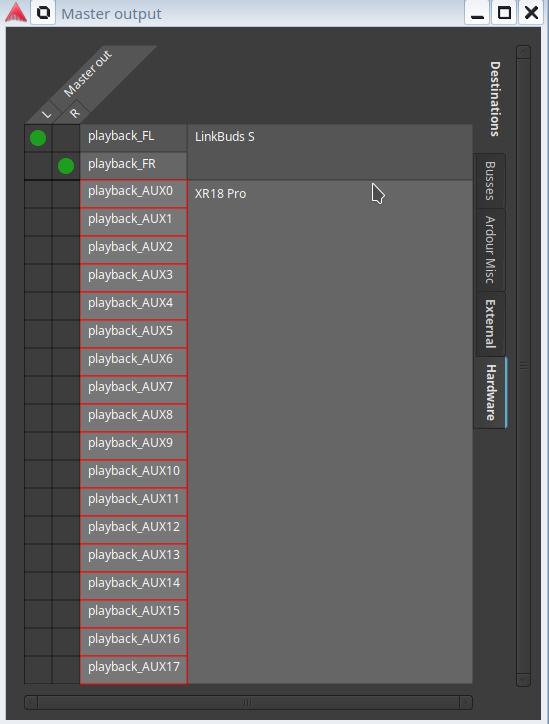
These also show up on qpwgraph:
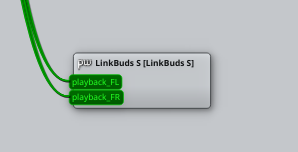
Cheers,
Keith
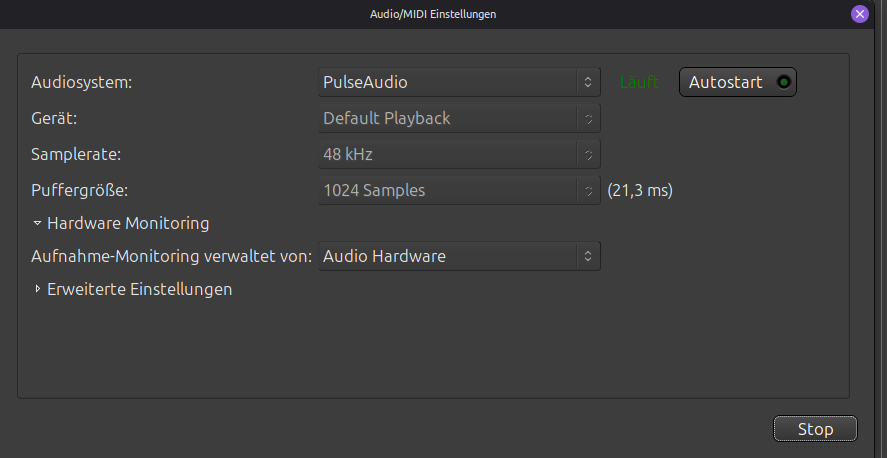
Could you maybe provide a couple of screenshots like Keith has? Might also be goid to include a snap of your audio device window in Ardour (can be found in edit → preferences → Audio/MIDI Setup, might also be under Menu > Window > Audio/MIDI Setup I think…?).
Might be ae to offer more suggestions then.
Okay so I literally changed nothing but I just selected PulseAudio and it works.
I have no idea why but I guess that’s good, I just wish I knew what happened so if it ever breaks again I can fix it, but oh well.
This topic was automatically closed 91 days after the last reply. New replies are no longer allowed.